

Verify people straight from Pipedrive
Run compliance from inside Pipedrive. Checks start from a record and the result lands back on the client.
Also listed under Marketing
Pipedrive is sales pipeline and CRM software for deal makers. Get super-organized. Close deals in less time. iOS and Android apps let you take your pipeline with you anywhere.
Description supplied by Pipedrive.
What starts a check from Pipedrive
You do not open StackGo. A change in the system starts the work, and the system stays your source of truth.
- IdentityCheck (person menu)
What StackGo puts back on the record
A KYC Status field and notes on the person. Nothing is written to deals or organisations. What goes back to your CRM by default.
| Field | What it holds |
|---|---|
| KYC Status Outcome | Started, then Positive, Negative, Resubmission required, Expired or Review |
| Notes Outcome | One when the check link is sent, and one with the decision and a link to the check |
- Outcome Carries no identity data. Safe anywhere your team already works.
A native connector, set up once
Trigger IdentityCheck from the person in Pipedrive; the result lands on the person.
Connect Pipedrive once from StackGo
A one-off set-up before your first check: connect Pipedrive. StackGo creates the KYC Status field on your people.
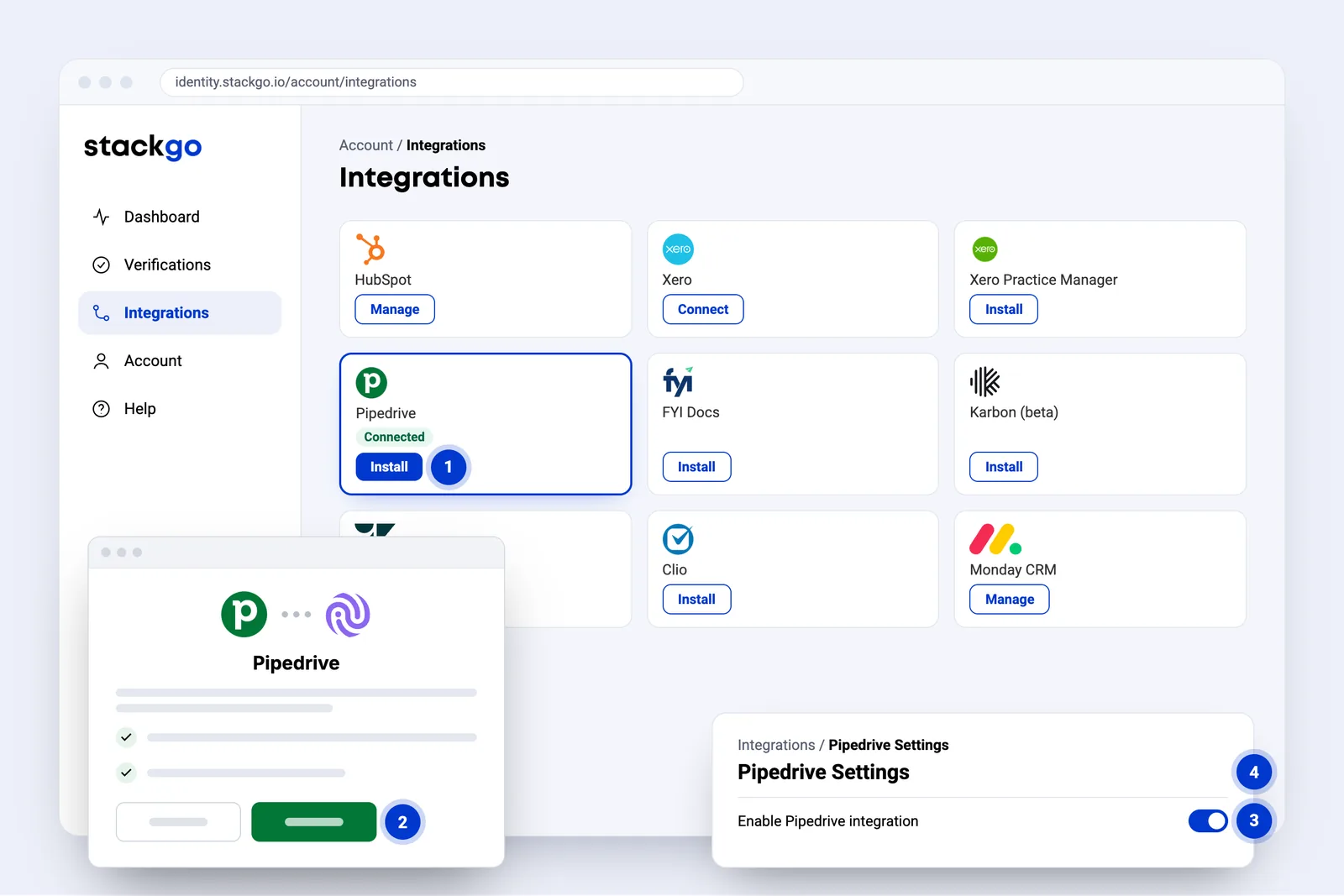
- Install on the Pipedrive card starts the connection.
- Pipedrive opens to sign in and allow access. Only when you install. StackGo never sees your password.
- Enable Pipedrive integration. A Pipedrive admin turns it on.
- A KYC Status field is created on your people in Pipedrive.
From a person in Pipedrive to a verified client
Once Pipedrive is connected, your team presses one button on the person. StackGo emails them, they verify on their phone, and the result comes back to the same person in Pipedrive.
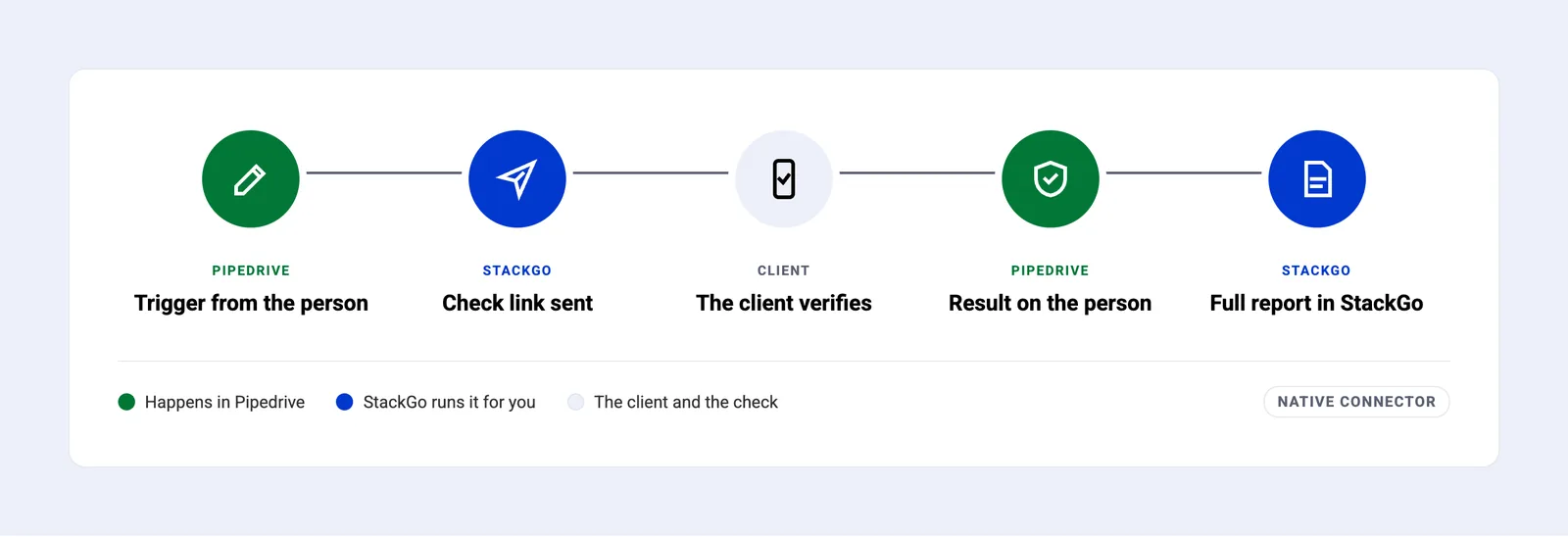
- Trigger from the person. In Pipedrive, open the person’s menu, choose IdentityCheck, then Trigger.
- Check link sent. StackGo emails the person, sets KYC Status to Started and adds a note.
- The client verifies. A short form if you ask for one, then ID photo and selfie on their phone.
- Result on the person. KYC Status shows the result, and a note links to the check.
- Full report in StackGo. Document, images and a timeline of the check, with a PDF for your records.
Trigger IdentityCheck from the person
Open the person, choose IdentityCheck from the … menu, and press Trigger.
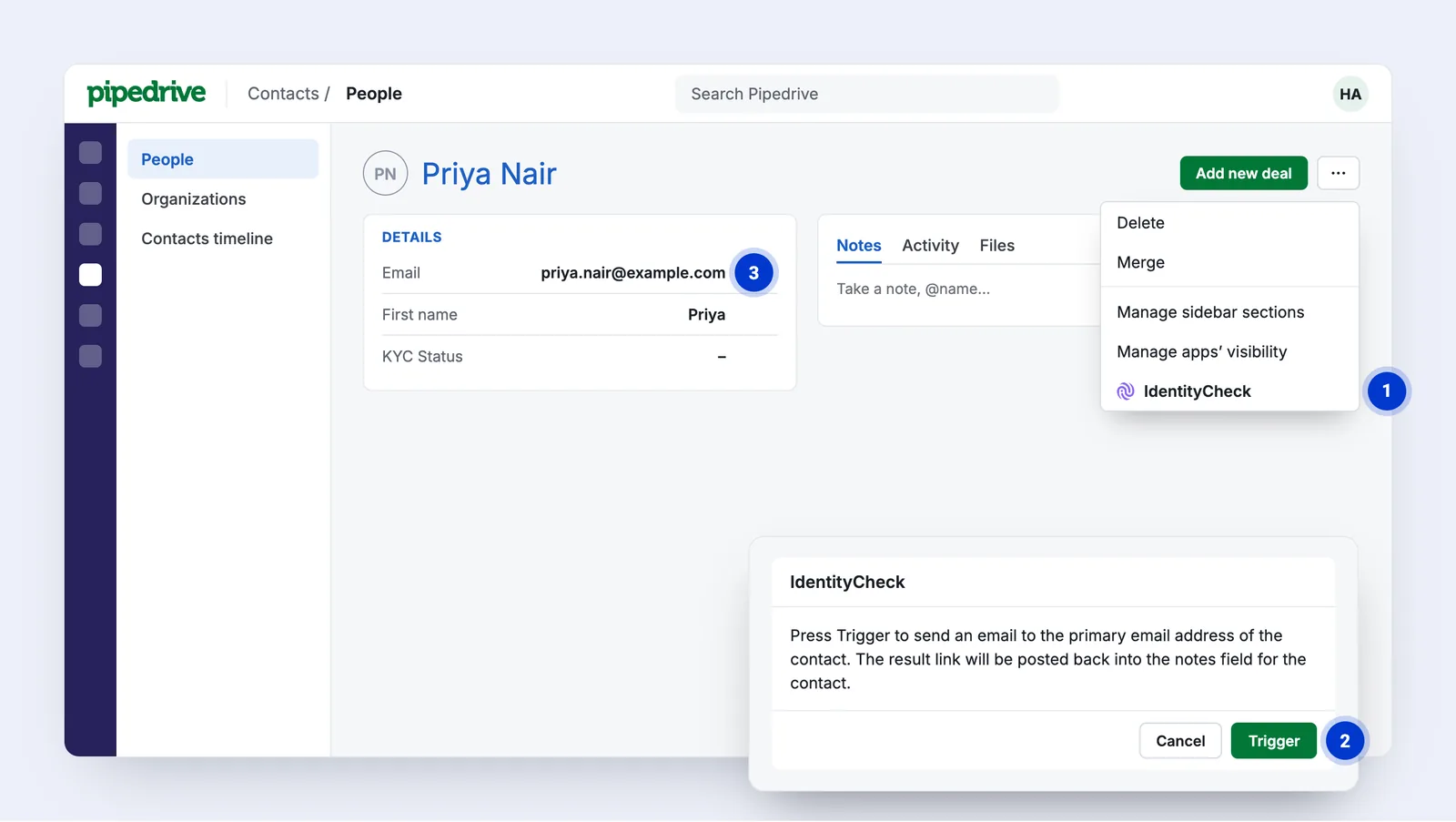
- IdentityCheck in the person’s menu opens the trigger.
- Trigger emails the check link to the person’s primary email address.
- The person’s email is where the link goes, so nobody types it again.
On the client’s phone, a few minutes, nothing to type
Everything happens on the client’s own phone, from the email StackGo sends.
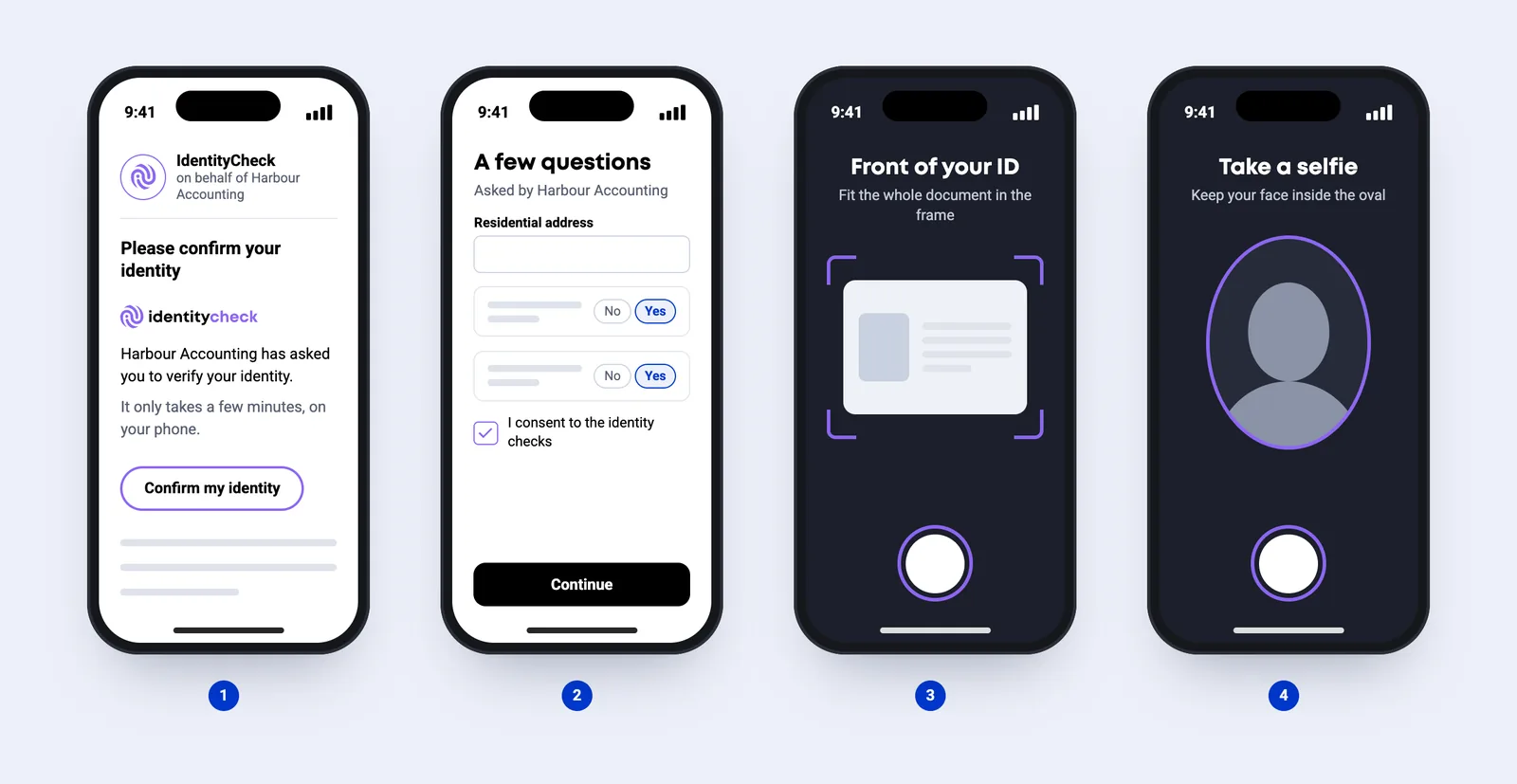
- Open the link. An email from IdentityCheck, sent on behalf of your business.
- A few questions (optional). Only if you have set up a form: details, consent or a few questions.
- Photograph the ID. Passport, driver licence or national ID card.
- Take a selfie. A quick photo to match their face to the ID.
The result lands on the Pipedrive person
The result lands on the person your team already works in, with a note in their notes.
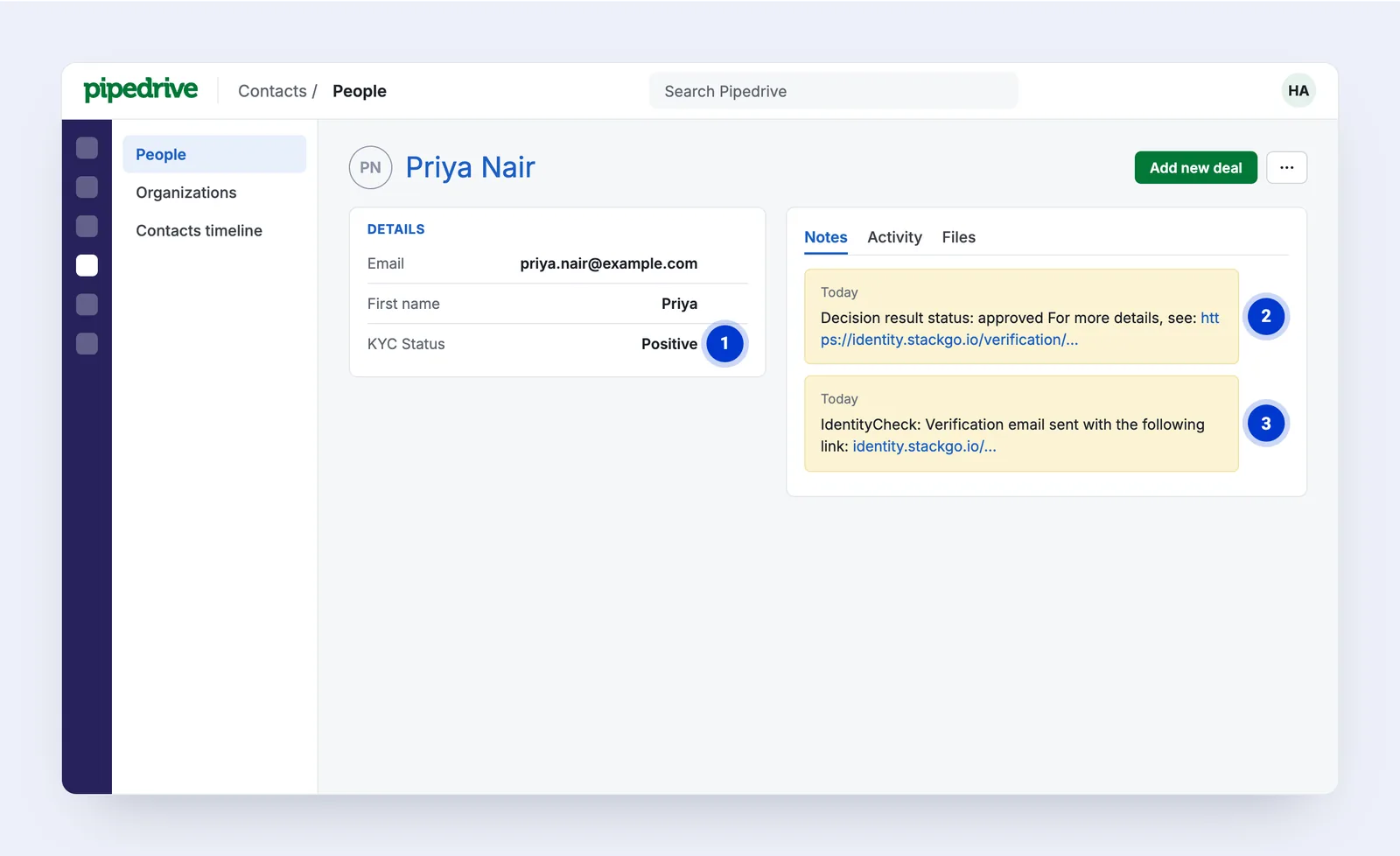
- KYC Status shows the result: Positive, Negative, Resubmission required, Expired or Review.
- A note on the person records the decision, with a link to the check in StackGo.
- An earlier note records when the check link was sent.
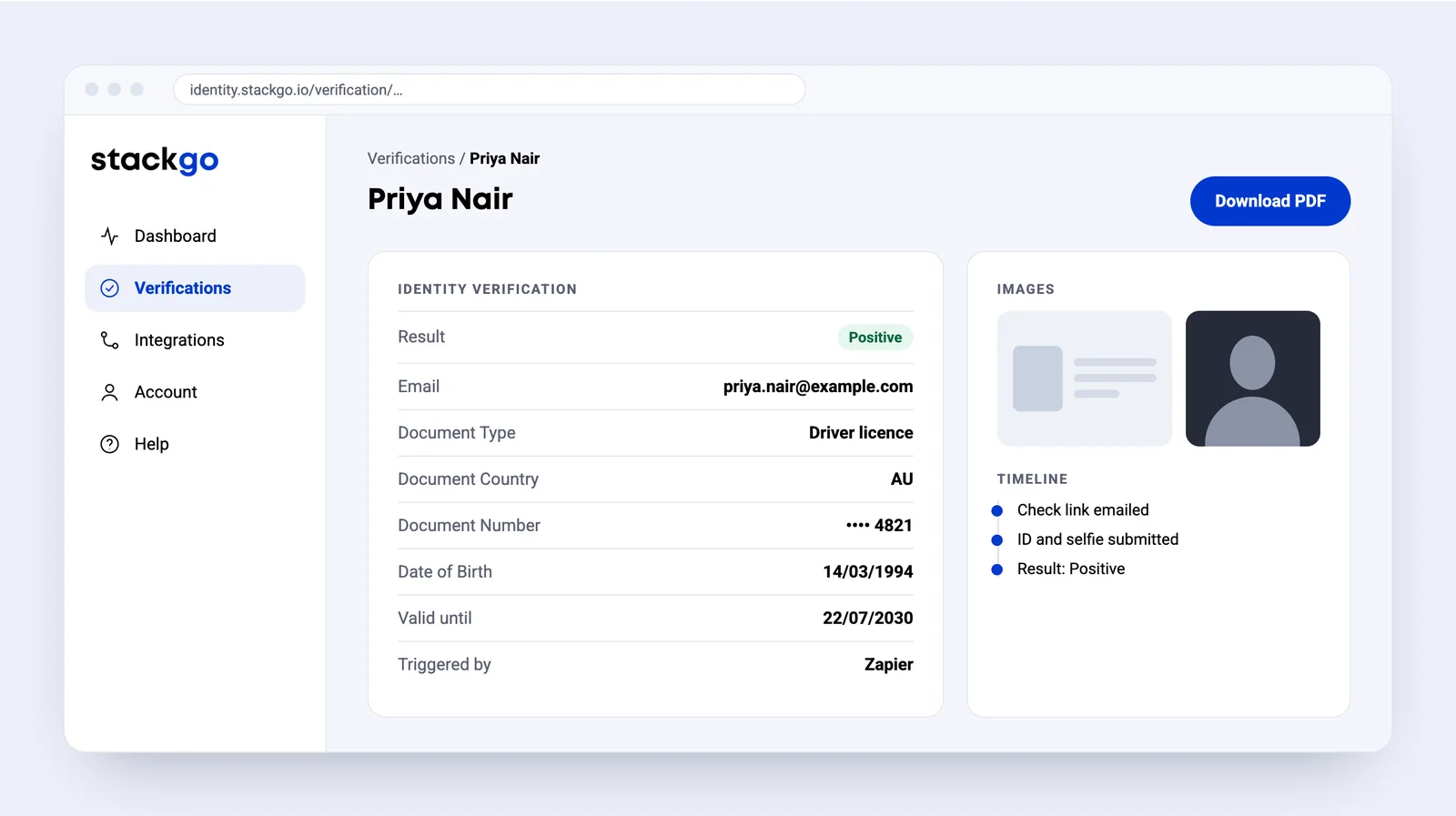
The result and the full report in StackGo
The report records the document, date of birth, ID and selfie images, and a timeline of the check. Download it as a PDF for your records.
Common questions about Pipedrive
How does StackGo connect to Pipedrive?
Natively. Click Install on the Pipedrive card under Integrations in StackGo to authorise StackGo in Pipedrive, then a Pipedrive admin turns on Enable Pipedrive integration. StackGo creates a KYC Status field on your people.
How do I start a check from Pipedrive?
On the person, open the … menu and choose IdentityCheck, then press Trigger. StackGo emails the check link to the person’s primary email address and sets KYC Status to Started.
What is written back to Pipedrive?
KYC Status is set to Positive, Negative, Resubmission required, Expired or Review, and notes on the person record when the link was sent and the decision, with a link to the check. Nothing is written to deals or organisations.
What does the client have to do?
Open the email from IdentityCheck on their phone, answer a short form if you have set one up, photograph their ID and take a selfie.
How does my team find out the result?
StackGo emails the Notification Email set under Account, Notifications, with the result in the subject line and a link to the full report. The PDF report can be attached if you ask us to turn it on.
Pipedrive is made by pipedrive.com. We are not affiliated with them.







Ready to make onboarding minutes, not hours?
Start free and run your first check today, or book a demo and we will walk you through it.