

Verify customers from MYOB
MYOB is coming soon. Once MYOB releases its Zapier app, a new customer will be able to start a check, with the result held in StackGo.
We found no public integration surface for MYOB: no Zapier app and no published events.
Also listed under HR & payroll
MYOB is an Australian multinational corporation that provides tax, accounting and other business services software to small and medium businesses.
Description supplied by MYOB.
What starts a check
You do not open StackGo. A change in the system starts the work, and the system stays your source of truth.
- New customer (TBC)
MYOB has not published its Zapier triggers yet, so the trigger name is TBC. Our other accounting connections start from a new customer, and MYOB is expected to work the same way.
Where the result goes
StackGo will email your team when the check is complete, and the result and full report will be in StackGo. Nothing is written back to MYOB through Zapier.
Through Zapier, once MYOB releases its app
Start a check when a customer is added, once MYOB releases its Zapier app.
Once MYOB’s Zapier app is out, one Zap starts Create Verification
A one-off set-up, once MYOB releases its Zapier app: one Zap, built once, runs for every new customer. The MYOB trigger name is TBC.
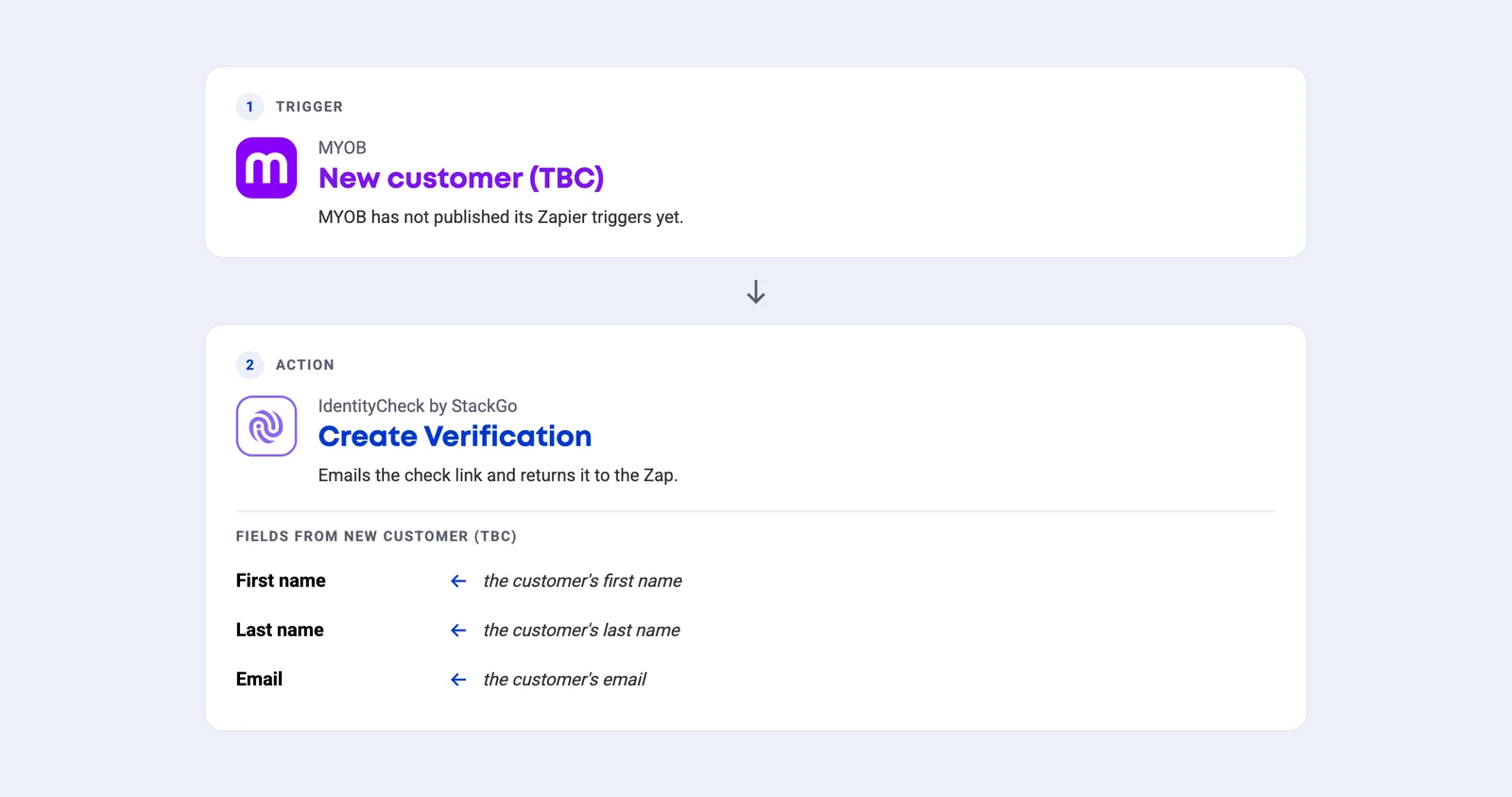
- Built once, runs for every client. Use the API key from StackGo, under Integrations, Zapier.
- The MYOB trigger name is TBC. MYOB has not published its Zapier triggers yet.
From a new customer in MYOB to a verified client
Once MYOB releases its Zapier app: your team adds the customer in MYOB, the Zap emails them a check link, they verify on their phone, and StackGo emails your team the result.
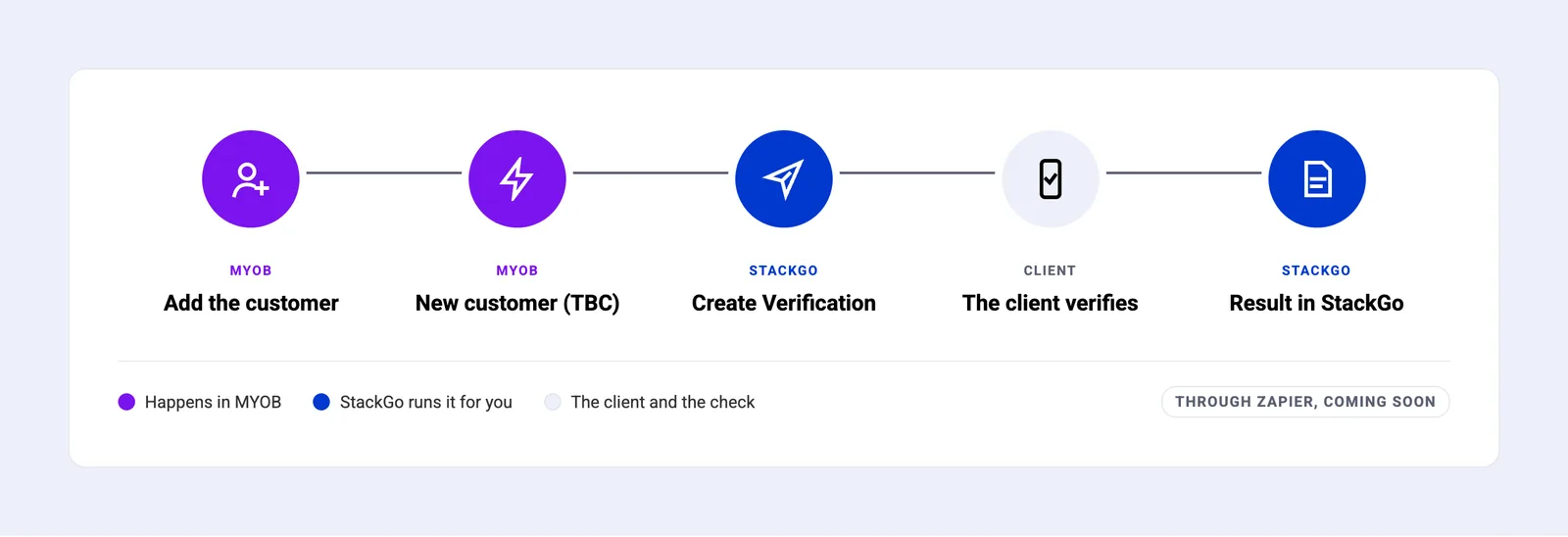
- Add the customer. From the Create menu, choose Contact, select Customer, add their name and email, and save.
- New customer (TBC). Once MYOB releases its Zapier app, saving a new customer starts the Zap. Trigger name TBC.
- Create Verification. The Zap passes the customer’s name and email to StackGo, which emails the check link.
- The client verifies. A short form if you ask for one, then ID photo and selfie on their phone.
- Result in StackGo. Result and full report in StackGo, and your team is emailed when the check is complete.
Add the customer in MYOB Business
Add the customer in MYOB Business with their name and email, and save. Once MYOB releases its Zapier app, that is what starts the check.
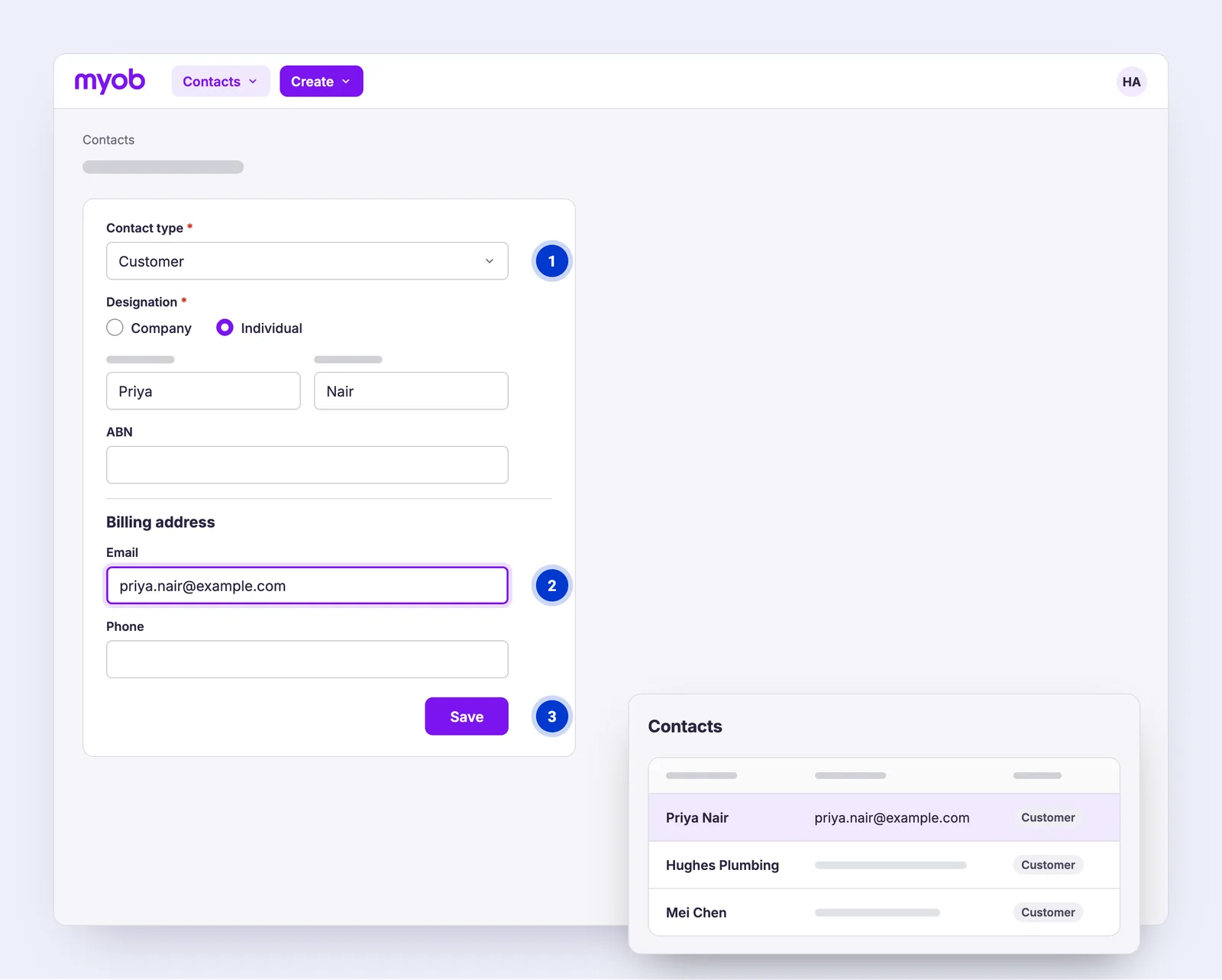
- Contact type: Customer. Once MYOB releases its Zapier app, a new customer is what starts the check.
- Include their email. MYOB does not require it, but the check link goes to this email.
- Save the new customer. Once MYOB releases its Zapier app, that is the moment New customer (TBC) fires.
On the client’s phone, a few minutes, nothing to type
Everything happens on the client’s own phone, from the email StackGo sends.
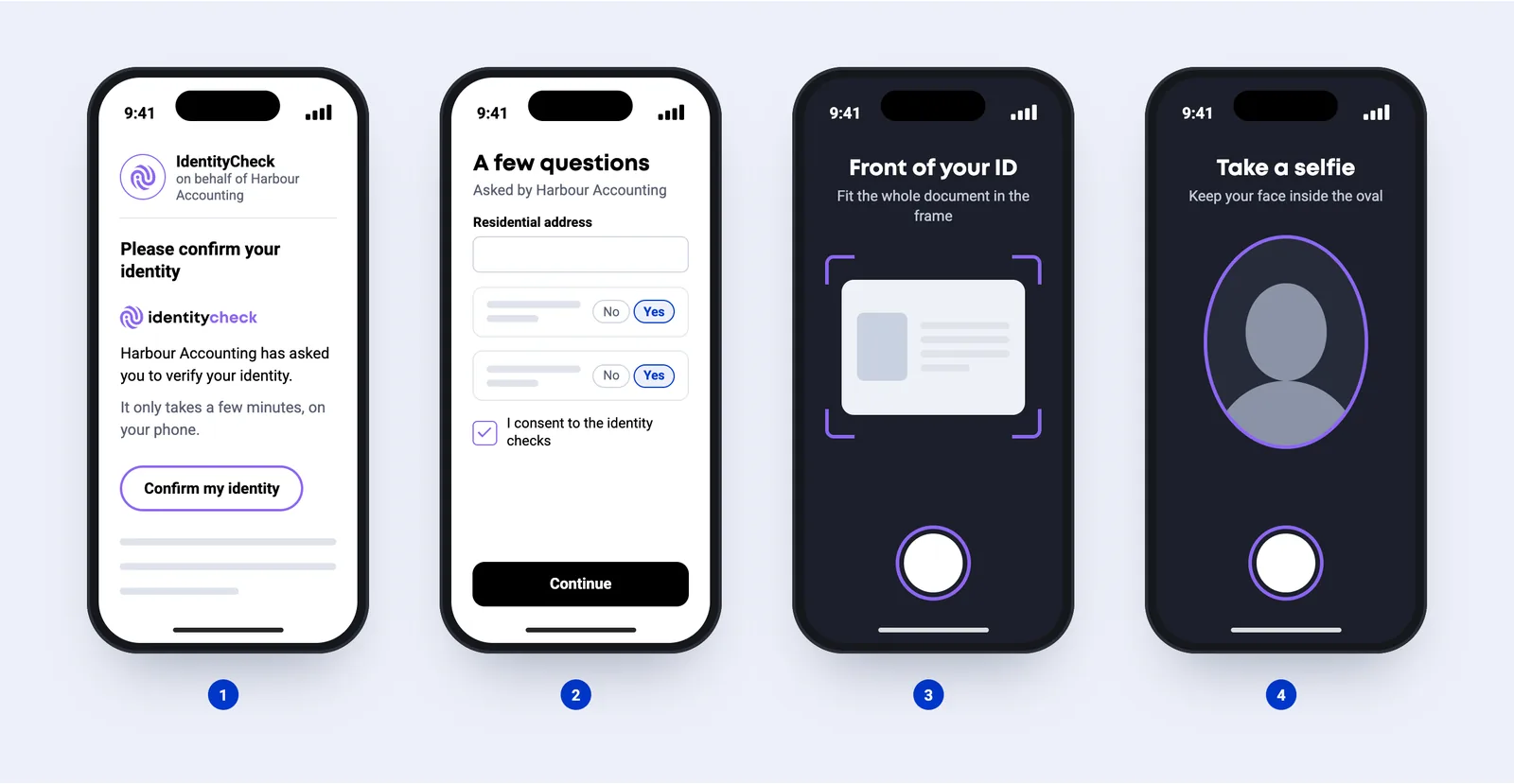
- Open the link. An email from IdentityCheck, sent on behalf of your business.
- A few questions (optional). Only if you have set up a form: details, consent or a few questions.
- Photograph the ID. Passport, driver licence or national ID card.
- Take a selfie. A quick photo to match their face to the ID.
StackGo emails your team when the check is complete
StackGo emails your team the result as soon as the check is complete.
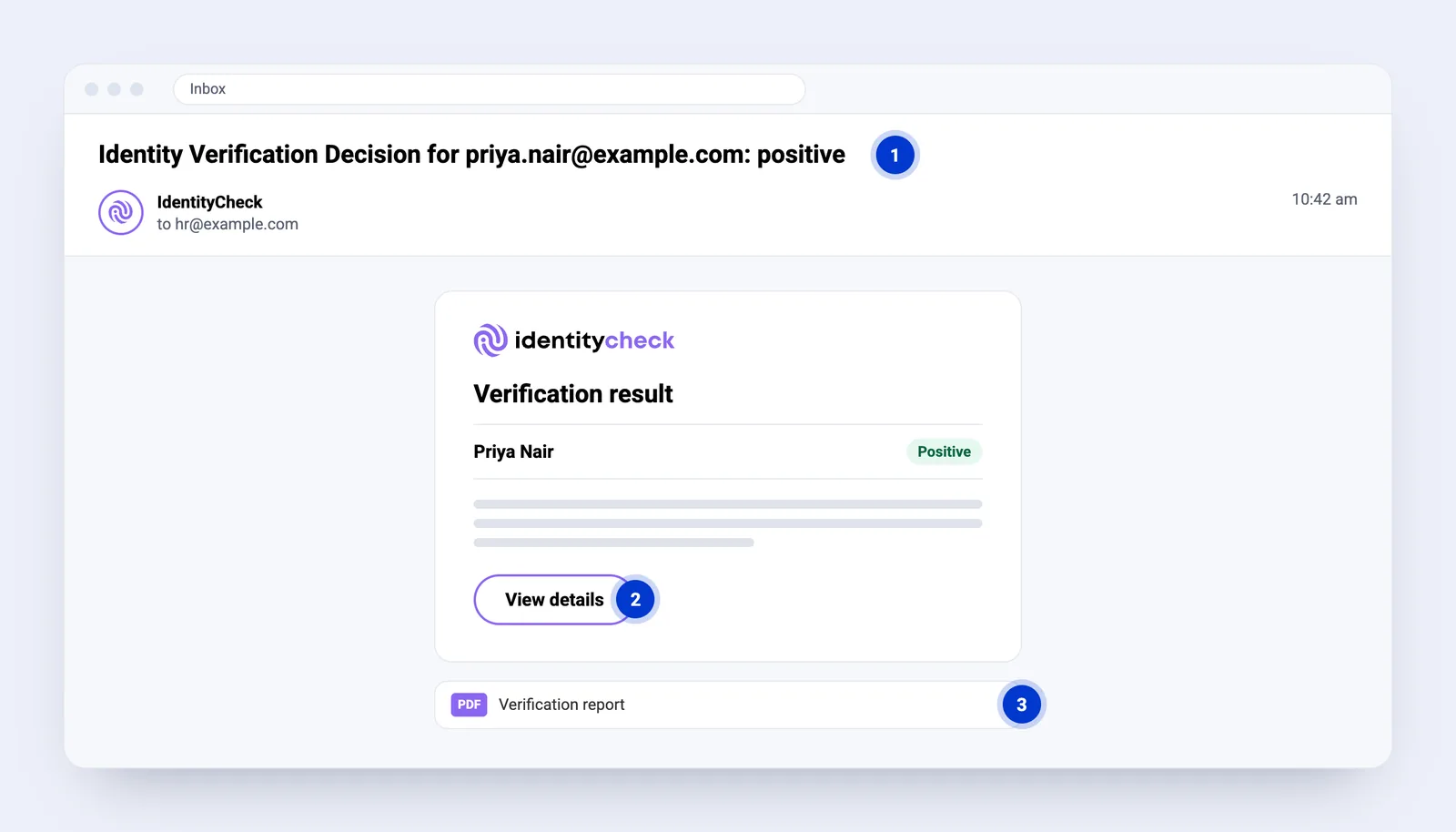
- The result is in the subject line. It goes to the Notification Email set in StackGo, under Account, Notifications.
- View details opens the full report in StackGo.
- The PDF report can be attached too. Ask us to turn it on.
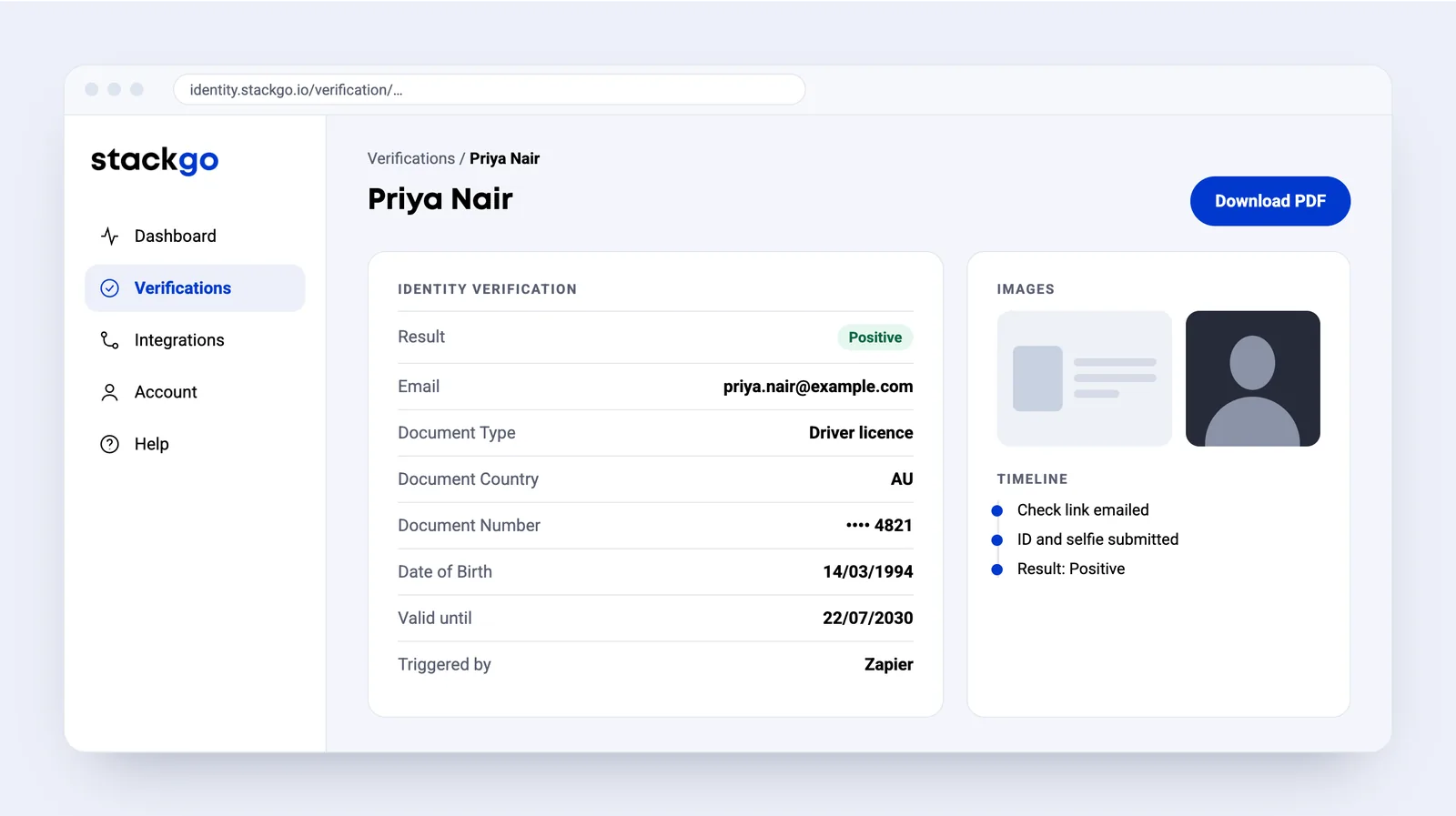
The result and the full report in StackGo
The report records the document, date of birth, ID and selfie images, and a timeline of the check. Download it as a PDF for your records.
Common questions about MYOB
What is MYOB integration?
We found no public integration surface for MYOB — no Zapier app and no published events. That is the honest reason there is no StackGo connector, and it is the thing that would have to change first.
Does StackGo write the result back to MYOB?
Not automatically. Through Zapier, nothing is written onto the MYOB record: IdentityCheck sends results by webhook, not as a Zapier trigger. StackGo emails your team when the check is complete, and the result and full report are in StackGo. If you need the result on the record, it can be set up from that webhook.
What does the client have to do?
Open the email from IdentityCheck on their phone, answer a short form if you have set one up, photograph their ID and take a selfie.
How does my team find out the result?
StackGo emails the Notification Email set under Account, Notifications, with the result in the subject line and a link to the full report. The PDF report can be attached if you ask us to turn it on.
Can something other than “New customer (TBC)” start a check?
MYOB has not published its Zapier triggers yet, so the trigger name is TBC. Our other accounting connections start from a new customer, and MYOB is expected to work the same way.
MYOB is made by www.myob.com/au. We are not affiliated with them.




MYOB is coming soon
MYOB has not released its Zapier app yet, so nothing can start a check from MYOB today. Tell us you need it and we will let you know as soon as it can.
Tell me when it is readyReady to make onboarding minutes, not hours?
Start free and run your first check today, or book a demo and we will walk you through it.