

Running compliance workflows across disconnected tools is a productivity killer. You’re copying data between tabs, chasing verification outcomes manually, and hoping nothing falls through the cracks. Business process integration software exists to solve exactly this, connecting your systems so that data, tasks, and workflows move automatically between them. For regulated businesses especially, getting this right isn’t optional; it’s the difference between scaling smoothly and drowning in admin.
The challenge is that not all integration platforms work the same way. Some are built for developers. Others rely on fragile automations that break when you need them most. And a growing number now offer productised integrations, purpose-built connections that handle specific workflows like identity verification or client onboarding without requiring you to build anything from scratch. At StackGo, that’s exactly the approach we take: our platform plugs compliance processes like KYC/AML checks directly into the CRMs businesses already use, such as HubSpot and Salesforce, with no new software to learn.
This article breaks down eight of the best business process integration tools available in 2026. We’ve compared them across features, use cases, and pricing to help you find the right fit, whether you need broad workflow automation or a focused solution for regulated operations. We’ve also included ourselves in the list where relevant, so you can see how StackGo stacks up alongside the other options.
1. StackGo IdentityCheck
StackGo IdentityCheck is a productised integration built for regulated businesses that need to run KYC/AML identity checks without leaving their existing CRM. Rather than patching tools together with a generic automation layer, IdentityCheck works natively inside platforms like HubSpot and Salesforce, pulling contact data, running verification, and writing the outcome back automatically.

What it does well
IdentityCheck removes the manual back-and-forth that slows client onboarding. You trigger a verification check directly from a CRM record, the system reads the contact’s information, submits it for identity verification across more than 200 countries and 10,000 document types, and logs the result without any manual input. There is no separate platform to open and no outcome to record by hand.
This is what targeted business process integration software looks like when it is purpose-built for a specific regulated workflow rather than general-purpose automation.
How it integrates processes
StackGo connects your CRM to identity verification providers through a privacy-first architecture. PII never sits inside the CRM; it passes through a secure privacy layer accessible only to MFA-authenticated admins. The end-to-end process handles everything in sequence:
- Contact data is read directly from the CRM record
- Data is submitted to the verification provider
- The verified outcome is written back to the CRM automatically
Who it fits best
Regulated professional services businesses get the most from IdentityCheck. Australian accounting firms managing TPB compliance or preparing for AUSTRAC AML/CTF obligations are a primary fit, alongside:
- Financial services and legal practices
- Commercial real estate agencies
- Recruitment and education businesses with mandatory identity checks
Your team needs to already use HubSpot or Salesforce as a core CRM. If your compliance process currently runs across separate tabs or spreadsheets, IdentityCheck closes that gap directly.
Pricing approach
StackGo charges on a per-check basis, so you pay for actual usage rather than a fixed monthly seat licence. This suits businesses with variable verification volumes, like accounting firms that see seasonal onboarding spikes. You can start without large upfront commitments and let costs scale as your compliance activity grows.
2. Workato
Workato is an enterprise-grade automation and integration platform that sits between developer-heavy tools and basic no-code builders. It targets teams managing complex, multi-step workflows across cloud applications and on-premise systems from a single environment.
What it does well
Workato’s standout feature is its recipe-based workflow builder, where you connect triggers, actions, and conditional logic through a visual interface. The platform supports hundreds of pre-built application connectors and handles error management, looping, and real-time event triggers without requiring you to write code from scratch.
How it integrates processes
The platform acts as a central coordination layer between your CRM, ERP, and other core systems, syncing data bidirectionally and responding to real-time events. For businesses evaluating this type of business process integration software, Workato offers considerably more logic depth and reliability than lightweight tools.
You do need someone familiar with your operations to build and maintain recipes correctly, so factor that into your resourcing before committing.
Who it fits best
Workato suits mid-market to enterprise teams with cross-functional workflow needs and at least one technically capable person to manage configurations. It works well for:
- Operations and IT teams coordinating complex data flows across departments
- Businesses integrating multiple enterprise platforms simultaneously
Pricing approach
Standard pricing is not published publicly on Workato’s site. Your team requests a custom quote based on workflow volume and connector requirements, which makes upfront cost comparison harder without going through a sales conversation first.
3. MuleSoft Anypoint Platform
MuleSoft Anypoint Platform is one of the most recognised names in enterprise integration, built by Salesforce to connect applications, data, and APIs at scale. It targets organisations running complex technology environments that need a unified layer to manage integrations across cloud, on-premise, and hybrid systems.
What it does well
The platform gives technical teams a full API lifecycle management environment, covering design, testing, deployment, and monitoring in one place. Its pre-built connectors and templates (called Accelerators) cover common enterprise applications like SAP, Workday, and Salesforce, which reduces the time required to stand up new integrations considerably.
How it integrates processes
Anypoint Platform acts as a central API-led connectivity layer, where every integration is treated as a reusable API rather than a point-to-point connection. This approach makes your business process integration software infrastructure more maintainable at scale, since updating one API propagates changes across every system that consumes it.
This architecture is powerful, but it does require skilled developers to implement and maintain it correctly.
Who it fits best
MuleSoft suits large enterprises with dedicated integration or platform engineering teams. It works best for organisations that:
- Manage a large number of connected systems across multiple departments
- Need API governance and security controls applied consistently at enterprise level
Pricing approach
Licensing is quote-based, tied to your specific capacity and connector requirements. Costs typically represent a substantial investment, which makes MuleSoft a better fit for enterprise budgets than small or mid-sized businesses exploring lighter integration options.
4. SAP Integration Suite
SAP Integration Suite is SAP’s cloud-based integration platform, designed to connect SAP and non-SAP applications across enterprise environments. It sits within the broader SAP Business Technology Platform ecosystem, making it a natural fit for organisations already running SAP products at the core of their operations.
What it does well
The platform covers multiple integration styles within one product, including API management, event-driven integration, and B2B/EDI connectivity. Its pre-built integration content library contains thousands of ready-made packages for connecting common enterprise applications, which cuts build time for standard use cases significantly.
How it integrates processes
SAP Integration Suite functions as a central middleware layer, routing data and events between your SAP core systems and external applications. As a piece of business process integration software, it gives technical teams the ability to monitor, manage, and govern all integrations from a single control plane rather than maintaining separate point-to-point connections.
This centralised approach is particularly valuable for businesses that rely on SAP ERP as their primary system of record.
Who it fits best
Large enterprises already running SAP ERP, S/4HANA, or related SAP products get the most from this platform. Organisations with dedicated integration teams who need:
- API lifecycle management across complex system landscapes
- B2B and EDI connections with external trading partners
Pricing approach
SAP prices the platform based on capability packages and consumption, with costs tied to message volume and which integration services you activate. This is a quote-based model, and the investment level suits enterprise budgets rather than smaller businesses exploring lighter integration options.
5. Oracle Integration
Oracle Integration is Oracle’s cloud-native integration platform, designed to connect Oracle applications and third-party systems across enterprise environments. It sits within Oracle Cloud Infrastructure and gives technical teams a structured environment for building, managing, and monitoring integrations at scale.
What it does well
Oracle Integration combines application integration, process automation, and visual application development in a single platform. Its library of pre-built adapters covers common enterprise applications including Salesforce, SAP, and ServiceNow, which reduces the time required to establish new connections between key systems.
For organisations already running Oracle products, the pre-built Oracle application adapters remove a significant amount of custom development work upfront.
How it integrates processes
The platform routes data and events between systems through a visual integration designer, where you configure triggers, mappings, and error-handling logic without writing extensive code. As a piece of business process integration software, it lets your team coordinate multi-step workflows across cloud and on-premise applications from a single management interface.
Who it fits best
Oracle Integration suits mid-to-large enterprises that already rely on Oracle ERP, HCM, or related Oracle Cloud applications as their primary systems. Your team will get the most value if you have:
- Dedicated integration developers managing complex data flows across Oracle and non-Oracle platforms
- A requirement for process automation alongside standard data synchronisation
Pricing approach
Oracle charges based on a consumption model, with costs tied to message volume. Pricing is available through Oracle’s sales team, and the investment level reflects enterprise-scale use, making it less practical for smaller businesses looking for lightweight integration options.
6. Boomi
Boomi is a cloud-native integration platform that positions itself as a low-code environment for connecting applications, data, and people across distributed business systems. Originally developed by Dell Technologies and now operating independently, it has built a strong reputation among mid-market organisations looking for a managed integration layer without heavy infrastructure overhead.
What it does well
Boomi’s visual drag-and-drop interface lets your team build integration workflows without writing extensive code. Its Boomi AtomSphere platform includes pre-built connectors for hundreds of applications and an AI-assisted mapping feature that suggests field mappings between systems, reducing the manual configuration effort for new integrations considerably.
How it integrates processes
As a piece of business process integration software, Boomi coordinates data movement between applications through lightweight runtime engines called "Atoms," which you can deploy in the cloud, on-premise, or in hybrid environments. Your team manages all integration logic, monitoring, and error handling from a centralised cloud-based control plane.
This deployment flexibility makes Boomi a practical option for businesses running a mix of cloud and legacy on-premise systems.
Who it fits best
Boomi suits mid-market businesses and larger enterprises that need a reliable, managed integration platform without the complexity of tools like MuleSoft. It works particularly well for organisations with a mix of SaaS and on-premise systems that require consistent data synchronisation across multiple teams and departments.
Pricing approach
Boomi offers tiered subscription plans based on connection volume and feature access. Costs scale with the number of connections and environments your business activates, and specific pricing requires a direct conversation with their sales team before you can compare options accurately.
7. Microsoft Power Automate
Microsoft Power Automate is Microsoft’s cloud-based automation and integration tool, sitting inside the broader Microsoft 365 and Power Platform ecosystem. It lets your team build automated workflows between hundreds of applications, with particularly strong native support for Microsoft products like Teams, SharePoint, Outlook, and Dynamics 365.
What it does well
Power Automate makes workflow automation accessible to non-technical users through a visual flow builder and a large library of pre-built templates. Its AI Builder capabilities let you add intelligent processing steps, such as extracting data from documents or analysing sentiment, without writing any code.
How it integrates processes
As a piece of business process integration software, Power Automate connects applications through a trigger-and-action model. Your team sets a trigger (like a new form submission or CRM record update), and the platform executes a defined sequence of automated actions across connected systems in response.
This model works well for straightforward, linear workflows but can become difficult to manage when your processes involve complex branching logic or high-volume data processing.
Who it fits best
Power Automate suits small to mid-sized businesses already using Microsoft 365 as their primary productivity environment. Organisations running Dynamics 365 or SharePoint as core platforms get the most value from the deep native connectivity on offer.
Pricing approach
Microsoft offers Power Automate through per-user and per-flow licence plans, with basic functionality included in many Microsoft 365 subscriptions. Premium connectors and higher-capacity plans require additional paid licences, so your actual cost depends on the specific connectors and automation volume your workflows require.
8. Camunda Platform 8
Camunda Platform 8 is an open-core process orchestration platform built around BPMN (Business Process Model and Notation) standards. Unlike most tools on this list, it centres its approach on formal process modelling, giving technical teams a structured language for defining, executing, and monitoring complex workflows across distributed systems.
What it does well
Camunda handles long-running, stateful business processes particularly well. Its workflow engine tracks process state across multiple steps and systems, so if a step fails or waits on an external event, the platform holds position without losing context. This makes it well-suited for complex approval workflows, multi-party coordination, and compliance-driven processes that involve many decision points.
This level of process visibility is harder to achieve with trigger-and-action automation tools that lack a formal process state model.
How it integrates processes
As a piece of business process integration software, Camunda connects to external systems through worker services that each execute a specific process task. Your developers deploy these workers to handle individual steps, such as calling an API or updating a record, while Camunda’s Zeebe engine coordinates the overall process flow and tracks completion across every stage.
Who it fits best
The platform suits engineering-led organisations that need fine-grained control over complex, multi-step processes. It works best when your team includes:
- Developers comfortable with BPMN process modelling
- Teams managing high-volume, long-running workflows across multiple systems
Pricing approach
The platform offers a self-managed open-source option alongside a paid SaaS tier. Pricing for the managed version is quote-based, with costs tied to process volume and your infrastructure requirements.
Final thoughts
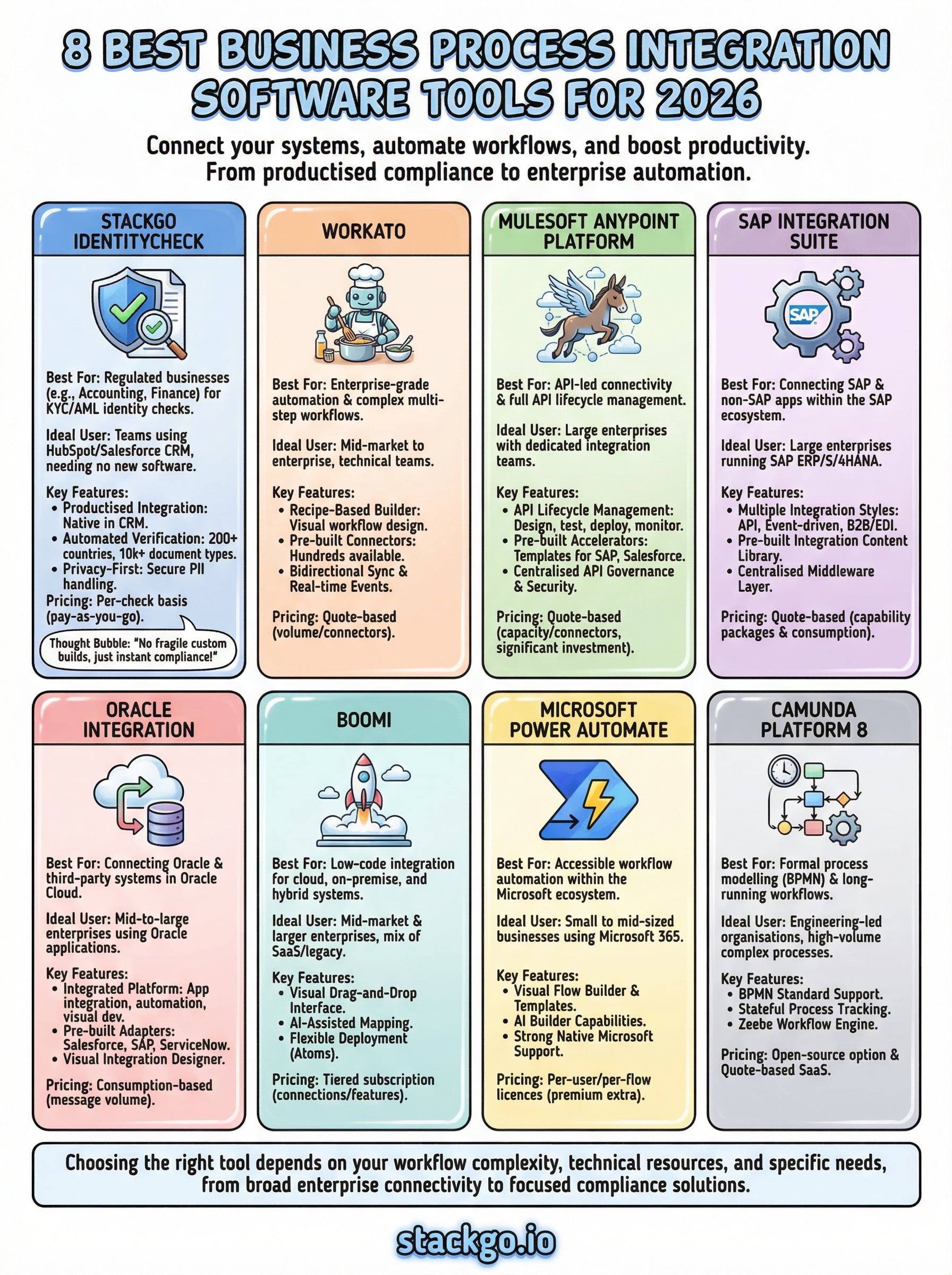
The right business process integration software depends entirely on what your workflows actually look like and how much technical resource you have available to build and maintain them. Enterprise platforms like MuleSoft, SAP Integration Suite, and Oracle Integration give large organisations broad connectivity and control, but they require skilled teams and significant investment to run well. Tools like Power Automate suit smaller businesses already inside the Microsoft ecosystem.
For regulated Australian businesses that need identity verification built directly into their existing CRM, StackGo IdentityCheck takes a different approach. Rather than giving you a general-purpose automation layer to configure yourself, it delivers a purpose-built compliance workflow out of the box, with no new software to learn and no fragile custom connections to maintain.
If your business runs KYC or AML checks today and you want to see whether IdentityCheck fits, create a free account and test the integration directly against your real workflow.


