

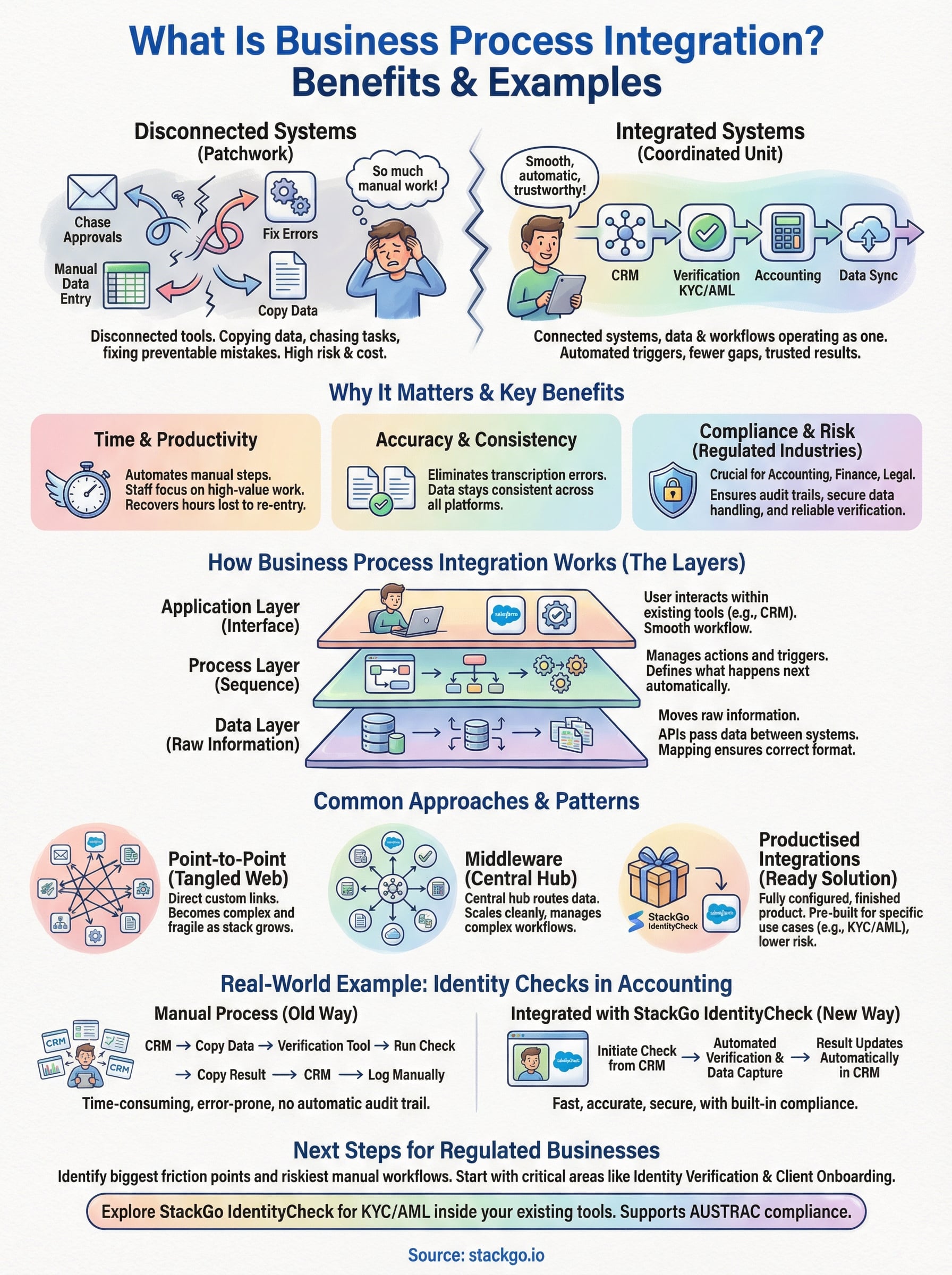
Every business runs on processes, onboarding a new client, verifying an identity, issuing an invoice, following up on a lead. The problem starts when those processes live across disconnected tools that don’t talk to each other. Staff end up copying data between tabs, chasing approvals through email chains, and fixing errors that shouldn’t have happened in the first place. What is business process integration? It’s the practice of connecting your systems, data, and workflows so they operate as one coordinated unit, not a patchwork of manual workarounds. For regulated industries like accounting, financial services, and legal, where compliance tasks are non-negotiable, getting this right directly affects risk, cost, and client experience.
At StackGo, this is exactly the problem we solve. Our integration platform lets businesses run critical workflows, like identity verification (KYC/AML) and client onboarding, directly inside the tools they already use, such as HubSpot or Salesforce. No extra software to learn. No fragile automation chains stitched together with duct tape. It’s business process integration made practical, not theoretical.
This article breaks down what business process integration actually means, why it matters, and how it works in practice. You’ll find real-world examples across different industries, a clear look at the benefits, and guidance on what to consider before connecting your own systems. Whether you’re an operations manager tired of double-handling data or a compliance officer looking for fewer gaps in your workflows, this is the overview you need.
Why business process integration matters
When your tools don’t connect, your team fills the gap manually. That sounds manageable until you count the hours spent re-entering client data, cross-checking spreadsheets, or waiting on approvals that should be automatic. The cost adds up fast, and it isn’t just measured in time. Errors that slip through disconnected workflows carry real consequences, especially in regulated industries where a missed verification step or an outdated record can trigger a compliance failure.
The hidden cost of manual workarounds
Most businesses underestimate how much disconnected systems actually cost them. A staff member who spends 30 minutes a day switching between tools and re-entering data burns through roughly 130 hours a year on tasks that should be automated. Multiply that across a team of five, and you’re looking at more than 600 hours of lost productivity annually. That’s real money, and it doesn’t account for the errors that come with repetitive manual work.
The knock-on effect is harder to quantify but just as damaging. When data lives in separate systems that don’t sync, you end up with version conflicts and incomplete records. Staff end up making decisions based on outdated information, and clients notice when things fall through the gaps. In service businesses, that directly affects retention and referrals.
Disconnected systems don’t just slow your team down. They introduce risk that your business carries silently until something goes wrong.
Why compliance-heavy industries feel this most
If you work in accounting, financial services, legal, or any other regulated profession, the consequences of poor integration are higher than for most. Australian accounting firms, for example, now face mounting obligations under the Tax Practitioners Board (TPB) and upcoming AUSTRAC AML/CTF reforms. Meeting those obligations requires collecting, verifying, and storing client information accurately, often under time pressure and at volume.
When your identity verification tool doesn’t connect to your CRM, your team runs checks manually and then logs the result by hand. That creates two immediate problems. First, human error becomes a real risk in a context where a wrong entry can mean a compliance breach. Second, you lose the audit trail that proves when a check was done and what it returned, which is exactly what regulators ask for.
What integration actually changes
Understanding what is business process integration is most useful when you see what changes once it’s in place. Processes that previously required five manual steps can collapse into a single automated trigger. Your team stops managing the workflow and starts trusting it. Client onboarding that once took days can complete in minutes when your verification, data capture, and CRM update all happen in sequence without anyone needing to intervene.
The shift also changes where your team’s attention goes. When routine compliance tasks run automatically, staff can spend more time on work that actually requires human judgement. For businesses where fee-earners bill by the hour, every hour recovered from administrative work goes directly to the bottom line. That’s not a minor efficiency gain. It’s a structural improvement in how your business operates.
How business process integration works
At its core, business process integration connects the systems, data, and rules that govern how your workflows run. Rather than having each tool operate in isolation, integration creates defined pathways for information to flow between them automatically. When one system captures data or completes an action, that event triggers the next step in a connected system, without anyone needing to step in and move things along manually. Understanding what is business process integration means understanding this chain of connected triggers, data transfers, and automated outcomes.
The layers that make integration possible
Integration doesn’t happen at just one level. It typically works across three distinct layers that each handle a different part of the connection:
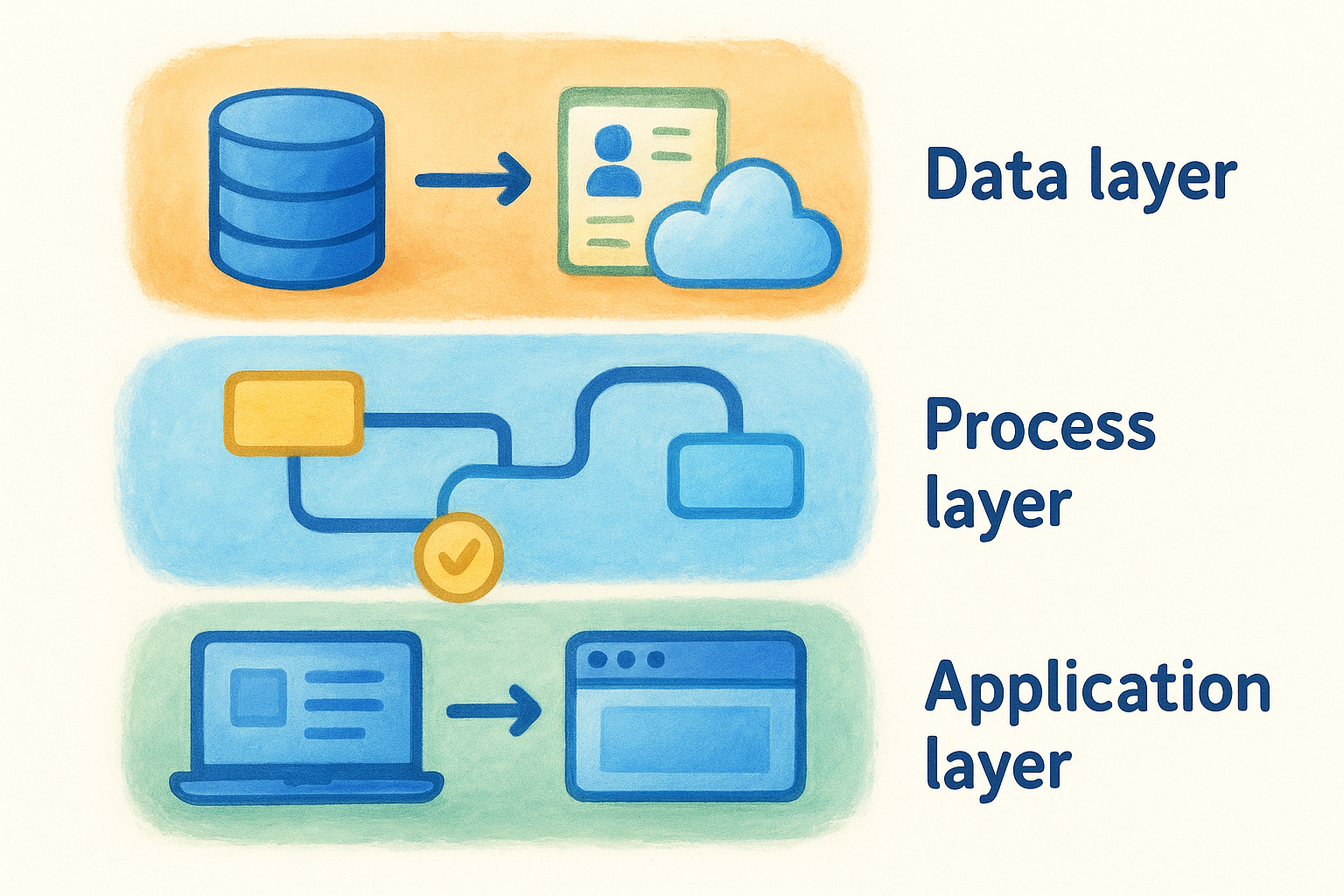
- Data layer: This is where raw information moves between systems. A contact record created in your CRM, for example, can automatically populate fields in your compliance tool or accounting platform without anyone copying it across.
- Process layer: This layer manages the sequence of actions. It determines what happens after a trigger fires, such as sending a verification request once a new client is added to your pipeline.
- Application layer: This is the interface through which your team interacts with the integrated workflow. A well-built integration surfaces the right information inside the tool your team already uses, so staff don’t need to switch between systems to complete a task.
When all three layers work together, your team experiences integration as a smooth, almost invisible process rather than a technical system they need to manage.
Integration that your team has to think about is integration that hasn’t been done properly.
How data moves between systems
Most integrations rely on APIs (Application Programming Interfaces) to pass data between platforms. An API defines the rules for how two systems communicate, what data can be sent, in what format, and under what conditions. When your CRM sends a request to an identity verification service and receives a result back, that entire exchange happens through the API in seconds.
The key to making this work reliably is mapping. Before data moves, someone needs to define which field in one system corresponds to which field in another. If your CRM stores a client’s date of birth in a field called "DOB" but your verification tool expects "date_of_birth", a properly configured integration handles that translation automatically, so the data arrives clean and usable on the other side.
Common approaches and integration patterns
Not all integrations are built the same way, and choosing the right approach matters more than most people realise. The pattern you pick determines how well your integration holds up as your business grows, how much maintenance it requires, and how quickly your team can adapt when a connected system changes. Understanding what is business process integration includes recognising which architectural approach fits your situation, because connecting tools without a clear pattern just creates a different kind of mess.
Point-to-point integration
Point-to-point integration connects two specific systems directly, with a custom link built between each pair. It’s the most straightforward approach, and for small setups with only two or three tools, it can work reasonably well. The problem appears when your stack grows. Each new tool you add requires its own direct connection to every other system it needs to communicate with, which produces a tangled web of dependencies. A few common signs that point-to-point integration is causing problems:
- Data inconsistencies appearing between systems after a platform update
- Staff manually reconciling records because two tools drifted out of sync
- A change in one platform breaking an unrelated workflow in another
The more point-to-point connections you build, the harder it becomes to change any single system without breaking several others.
Middleware and integration platforms
Middleware sits between your systems and acts as a central hub that routes data across your entire stack. Instead of connecting every tool directly to every other tool, each system connects to the middleware layer, which then handles where information goes and in what format. This approach scales far more cleanly. Platforms like Microsoft Azure Integration Services are built on this model, allowing businesses to manage complex, multi-system workflows without rebuilding every connection each time something in the environment changes.
Productised integrations
Productised integrations take a specific, repeatable workflow and deliver it as a fully configured, ready-to-deploy solution rather than a custom-built project. Your team does not need a developer to wire things together or maintain a fragile automation chain. The integration ships as a finished product with defined inputs, outputs, and built-in error handling. For compliance-heavy workflows, this approach carries the least risk because the integration has been designed, tested, and refined for that exact use case rather than assembled from scratch each time.
Benefits, risks, and common challenges
Understanding what is business process integration goes beyond knowing how it works technically. The real question is what it means for your business in practice, both the gains you can reasonably expect and the problems that surface when integration is approached carelessly. Neither side of that picture should be ignored before you commit to connecting your systems.
What you gain from integration
The most immediate benefit is time. Workflows that previously required multiple manual steps complete automatically, which frees your team to focus on higher-value work. For regulated businesses in particular, compliance tasks like identity verification and client onboarding stop being bottlenecks and become background operations that your team trusts to run correctly without supervision.
Accuracy improves alongside speed. When data moves between systems through a defined, automated pathway, you eliminate the transcription errors that come with manual re-entry. Your records stay consistent across platforms, which matters enormously when a regulator or auditor asks you to demonstrate when a check was completed and what the result was.
Reliable data across connected systems is the foundation of any compliance process that holds up under scrutiny.
Risks and challenges to plan for
Integration introduces dependencies that need to be managed. If one system in your workflow changes, whether through a platform update or a configuration shift, connected processes can break without warning. That is a genuine risk, and it is why productised, well-maintained integrations carry a significant advantage over custom-built solutions assembled in-house without ongoing support.
Data security deserves direct attention. Moving sensitive information between platforms increases the number of points where that data could be exposed or mishandled. For businesses handling personally identifiable information (PII), such as identity documents or financial records, your integration approach needs to account for how data is transmitted, where it is stored, and who can access it. Australia’s Australian Privacy Principles set clear obligations here that your integration setup must actively support, not just acknowledge in a policy document.
Finally, poor scoping at the start creates rework further down the line. Businesses that rush integration without mapping their existing workflows first tend to discover gaps after go-live, when fixing them is more disruptive and expensive than getting it right upfront.
Real-world examples you can relate to
Abstract explanations of what is business process integration only go so far. Seeing how integration plays out in specific workflows helps you judge where the same logic applies to your own operations. The examples below cover a few different industries, but the underlying pattern is consistent: disconnected manual steps collapse into a single coordinated sequence, and the time lost in between disappears.
Australian accounting firms running identity checks
Under TPB requirements and the incoming AUSTRAC AML/CTF obligations, Australian accounting firms must verify client identities before providing certain services. Without integration, that process typically involves a staff member opening a separate verification tool, manually entering client details, running the check, then returning to the CRM to log the result by hand.

With a productised integration like StackGo’s IdentityCheck, that entire sequence runs from inside HubSpot or Salesforce. The staff member initiates the check from the contact record, the verification completes automatically, and the outcome writes back without anyone copying anything across. The client’s personally identifiable information never sits in the CRM, which directly supports the firm’s obligations under the Australian Privacy Principles.
A workflow that once took ten minutes per client can complete in under sixty seconds when your systems are properly connected.
Recruitment agencies screening candidates
Background screening is mandatory for many placements, particularly in aged care, education, and financial services. Agencies running these checks through a standalone portal face the same friction as accounting firms: data entered manually in one place, results logged manually in another. When a recruiter manages dozens of candidates at once, that double-handling becomes a serious bottleneck.
Integration connects the screening process directly to the candidate record in the agency’s CRM or applicant tracking system. A check triggers automatically when a candidate reaches a specific pipeline stage, and the result flows back once it clears. Staff spend their time placing candidates rather than administering checks.
Financial services firms onboarding new clients
KYC requirements apply at the point of onboarding, which is precisely when speed and accuracy matter most. An integrated workflow captures client details once, routes them through identity verification, and updates the client record automatically. Nothing gets re-entered. No step relies on someone remembering to follow through. The process runs correctly every time, which is exactly what a compliance framework requires.
Next steps
Business process integration stops being abstract once you see it through the lens of your own workflows. The question isn’t whether your business would benefit from connecting its systems. It almost certainly would. The real question is where the biggest friction points are and which workflows carry the most risk when they run manually. For regulated businesses in Australia, identity verification and client onboarding are almost always the right place to start, because errors there carry direct compliance consequences.
If you work in accounting, financial services, or any other compliance-heavy industry, understanding what is business process integration is only half the picture. Acting on it is what creates real change. StackGo’s IdentityCheck is built specifically for businesses that need to run KYC and AML checks without adopting new standalone software or managing fragile automation chains. You can explore how IdentityCheck supports AUSTRAC Tranche 2 compliance or create a free account to test whether it fits your existing workflow today.


