

Most businesses run somewhere between five and fifteen SaaS applications. CRM, accounting, marketing, compliance, each tool handles a piece of the puzzle, but rarely do they talk to each other without help. A SaaS integration platform bridges that gap, connecting your apps so data flows automatically between them and your team stops copying information from one tab to another.
The problem is that not all integration platforms solve the same problem. Some focus on simple automations, if this, then that. Others, like StackGo, take a productised approach by embedding critical workflows (think identity verification and client onboarding) directly into the tools you already use, like HubSpot or Salesforce. The right choice depends on whether you need lightweight task automation or robust, compliance-grade integrations that your business actually depends on.
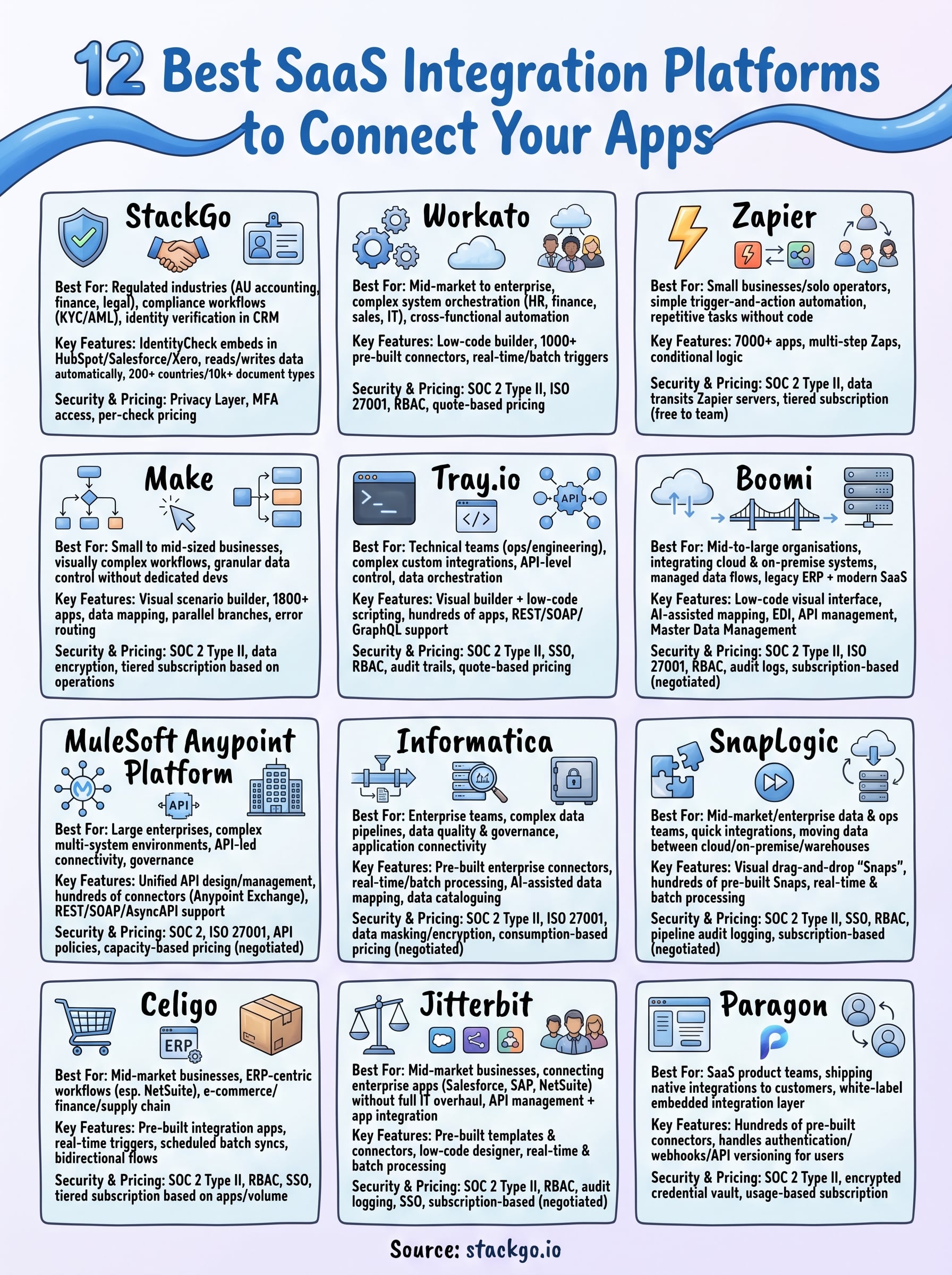
This guide breaks down 12 of the best SaaS integration platforms available right now. For each, we cover what it does well, where it falls short, and who it’s built for, so you can make a decision based on your actual workflows rather than feature lists. Whether you’re an operations manager trying to streamline onboarding or a compliance officer looking for something that won’t break under regulatory scrutiny, you’ll find a platform here that fits.
1. StackGo
StackGo is a productised SaaS integration platform built for regulated industries that need to run compliance workflows, like identity verification and KYC/AML checks, directly inside the software they already use. Rather than bolt on another standalone tool, StackGo embeds critical compliance functions into platforms like HubSpot, Salesforce, and Xero so your team never has to leave their primary workspace.
What it is best for
If your business operates in a regulated industry, particularly Australian accounting, financial services, or legal sectors, and you need to verify client identities without switching between systems, StackGo is built precisely for that. It removes the friction of compliance by sitting inside your existing CRM and handling the entire verification workflow from within that environment, including reading contact data, running the check, and writing the result back automatically.
StackGo is particularly well-suited for Australian accounting firms facing AUSTRAC AML/CTF obligations or TPB requirements, where verifying client identity is mandatory and manual processes introduce serious risk.
Practices that currently use spreadsheets, email attachments, or disconnected portals to manage identity checks will find that StackGo cuts both the time and the error rate tied to those manual workflows.
Key integration capabilities
StackGo’s core product, IdentityCheck, reads contact information directly from your CRM, checks it against a global database covering over 200 countries and 10,000 document types, and writes the verified outcome back to the contact record. No manual data re-entry, no copy-pasting between tabs.
The platform connects natively with tools like HubSpot, Salesforce, and Xero, which means deployment does not require custom automation builds or the kind of fragile workflow logic that tools like Zapier rely on for critical compliance processes.
Security and compliance notes
StackGo’s Privacy Layer ensures that personally identifiable information is never stored inside your CRM. Only MFA-authenticated administrators can access sensitive client data, which is a meaningful safeguard when you are handling identity documents and financial records tied to AML/CTF compliance obligations.
Pricing model
IdentityCheck is priced on a per-check basis, so you pay only for the verifications you run rather than a fixed monthly seat licence. This model works well for businesses with variable onboarding volumes, such as accounting firms that process a surge of new clients at the start of the financial year.
2. Workato
Workato is an enterprise-grade SaaS integration platform that combines integration and automation into a single environment. It targets mid-market to enterprise businesses that need to connect complex systems across HR, finance, sales, and IT without relying entirely on their engineering team to build and maintain everything.
What it is best for
Workato works best for larger organisations that run multiple enterprise systems and need automated workflows across departments. If your business uses tools like Salesforce, Workday, or ServiceNow together, Workato lets you orchestrate data between them through a low-code builder that both business users and IT teams can operate confidently.
Workato suits organisations where cross-functional automation, not just simple point-to-point app connections, is the core requirement.
Key integration capabilities
The platform offers a library of over 1,000 pre-built connectors, which reduces the time your team spends building integrations from scratch. It also supports real-time event triggers and batch processing, so you can run workflows based on specific actions or scheduled intervals depending on your operational needs.
Security and compliance notes
Workato holds SOC 2 Type II and ISO 27001 certifications, giving enterprise procurement and security teams a clear compliance baseline to work with. The platform also provides role-based access controls and audit logging, which matter when your workflows handle sensitive customer or financial data.
Pricing model
Workato does not publish a standard price list publicly. Costs are negotiated on a quote basis, based on your usage volume and number of active workflows. This means it is difficult to assess total cost without going through a sales process first.
3. Zapier
Zapier is the most widely recognised saas integration platform for small businesses and solo operators. It runs on a straightforward trigger-and-action model: when something happens in one app, Zapier fires an action in another. That simplicity is both its biggest strength and its clearest limitation.
What it is best for
Small teams and individuals who need to automate repetitive tasks between popular web apps without writing code are Zapier’s core audience. Common use cases include:
- Routing form submissions automatically to a CRM or spreadsheet
- Sending Slack notifications when deal stages or ticket statuses change
- Syncing contacts between marketing and sales tools
Zapier is not built for compliance-critical workflows that require audit trails and guaranteed data integrity, so regulated businesses should factor that in before relying on it for anything mandatory.
Key integration capabilities
Zapier connects over 7,000 apps through its library of pre-built integrations, which gives it one of the broadest app networks of any platform in this list. You can build multi-step Zaps with basic conditional logic to chain several actions together from a single trigger event.
Security and compliance notes
Zapier holds SOC 2 Type II certification, but its architecture routes your data through Zapier’s own servers on every workflow run. For businesses handling sensitive or regulated client data, that third-party data transit introduces a risk surface worth including in your security assessment before you automate anything critical.
Pricing model
Zapier runs a tiered subscription model based on monthly task volume. Plans move from a free tier for light use up through Starter, Professional, and Team levels, with costs rising as your task count and advanced feature requirements grow.
4. Make
Make (formerly Integromat) is a visual saas integration platform that positions itself between the simplicity of Zapier and the complexity of enterprise tools. It uses a drag-and-drop scenario builder that gives technically minded users granular control over data transformation and workflow logic without requiring them to write code from scratch.
What it is best for
Small to mid-sized businesses that need more than basic trigger-action automations will find Make useful, particularly if your team lacks dedicated developer support. If you need to map data fields, apply conditional filters, or run parallel branches within a single workflow, Make’s visual canvas gives you that level of control in a way that Zapier’s simpler model does not.
Make works well when your automation logic is moderately complex but your team does not have the developer bandwidth to build and maintain custom code solutions.
Key integration capabilities
Make connects with over 1,800 apps through its built-in connector library, covering tools across marketing, e-commerce, project management, and CRM categories. The platform lets you transform and route data across multiple workflow branches, which means you can build scenarios that handle error routing and multi-step data processing within a single visual view.
Security and compliance notes
Make holds SOC 2 Type II certification and provides data encryption in transit and at rest. Your data passes through Make’s servers on every scenario run, so businesses with strict data residency or regulatory requirements should assess that architecture carefully before automating sensitive client information through the platform.
Pricing model
Make runs a tiered subscription model based on monthly operations, where one operation equals one module execution within a scenario. Paid plans scale with your operation volume and team size, starting at a low monthly entry point and increasing as your workflow complexity grows.
5. Tray.io
Tray.io is a cloud-based saas integration platform designed for technical teams that need to build complex, custom integrations at scale. It sits firmly in the mid-market to enterprise space, prioritising flexibility and developer control over the point-and-click simplicity you get from tools like Zapier or Make.
What it is best for
Tray.io suits operations and engineering teams that need to build sophisticated workflows involving multiple APIs, custom logic, and cross-system data orchestration. If your business runs a technology stack where off-the-shelf connectors fall short and you need to call APIs directly, Tray gives your team the depth to build what standard automation tools cannot handle.
Tray.io is less suited to non-technical users who need to build and manage their own automations without developer involvement.
Key integration capabilities
The platform offers a visual workflow builder combined with a low-code scripting environment, so your developers can drop into custom code when the drag-and-drop canvas reaches its limits. Tray connects to hundreds of applications and supports REST, SOAP, and GraphQL APIs, giving you broad reach when building workflows that span uncommon or custom internal tools.
Security and compliance notes
Tray.io holds SOC 2 Type II certification and supports single sign-on through enterprise identity providers. The platform provides role-based access controls and audit trails, which gives IT and security teams a degree of governance over who builds and modifies workflows that touch sensitive data.
Pricing model
Tray.io operates on a quote-based pricing model negotiated directly with their sales team. There is no public pricing page, so you need to contact them to understand what the platform will cost for your specific usage requirements.
6. Boomi
Boomi is a cloud-native saas integration platform that has been in the market since 2000 and sits comfortably in the enterprise and mid-market space. It focuses on connecting applications, data, and people across complex IT environments through a low-code visual interface that reduces the burden on your development team.
What it is best for
Boomi works best for mid-to-large organisations that need to integrate on-premise systems with cloud applications across multiple departments. If your business runs legacy ERP software alongside modern SaaS tools and you need reliable, managed data flows between them, Boomi gives your IT and operations teams a single environment to build and govern those connections.
Boomi suits businesses that already have an IT function involved in integration work and need a platform that can handle both cloud and on-premise environments without forcing a full infrastructure rebuild.
Key integration capabilities
The platform offers a library of hundreds of pre-built connectors and an AI-assisted workflow builder that speeds up the time it takes to map data between systems. Boomi supports EDI, API management, and master data management within the same platform, which reduces the number of tools your team needs to maintain separately.
Security and compliance notes
Boomi holds SOC 2 Type II and ISO 27001 certifications and supports role-based access controls across all integration assets. The platform also provides detailed audit logs, which gives your compliance and IT teams visibility into who accessed or modified workflows.
Pricing model
Boomi uses a subscription-based pricing model negotiated through their sales team, with tiers based on connection volume and feature requirements. Public pricing is not available, so direct contact with Boomi is necessary to get an accurate cost estimate.
7. MuleSoft Anypoint Platform
MuleSoft Anypoint Platform is an enterprise-grade saas integration platform owned by Salesforce that builds connectivity around an API-led model. Rather than wiring apps together point-to-point, MuleSoft encourages your team to expose business capabilities as reusable APIs that other systems and teams can draw on without rebuilding the same logic repeatedly.
What it is best for
MuleSoft targets large enterprises running complex, multi-system environments where API governance is as important as workflow automation. If your organisation runs Salesforce alongside SAP, Oracle, or other heavyweight platforms, MuleSoft gives your architects a unified environment to design, publish, and govern integrations at scale.
MuleSoft is significantly more technical than lighter automation tools, so teams without dedicated integration architects will find the learning curve steep and the setup time long.
Key integration capabilities
The platform provides access to hundreds of pre-built connectors through its Anypoint Exchange marketplace, covering enterprise applications, databases, and protocols. Key capabilities include:
- API design and lifecycle management within the same environment
- Support for REST, SOAP, and AsyncAPI standards
- Runtime deployment across cloud, on-premise, and hybrid environments
Security and compliance notes
MuleSoft holds SOC 2 and ISO 27001 certifications and enforces security policies at the API gateway layer. Your security team can apply authentication rules, rate limiting, and data masking consistently across all connected systems from a central policy management console.
Pricing model
MuleSoft prices on a capacity-based model tied to data volume and core usage. Costs are negotiated through Salesforce’s sales team, and total cost of ownership sits at the higher end compared to most mid-market integration platforms.
8. Informatica
Informatica is an enterprise-focused saas integration platform with a long history in data management and cloud integration. It targets large organisations that need to handle complex data pipelines, data quality, and application connectivity within a single governed environment.
What it is best for
Informatica suits enterprise teams where data management and integration go hand in hand. If your organisation needs to connect cloud applications while also maintaining data quality rules, cataloguing assets, and enforcing governance policies across the business, Informatica handles both within the same platform rather than forcing you to run separate tools alongside each other.
Informatica is best suited to businesses with dedicated data engineering teams, as the platform’s depth requires meaningful technical investment to configure and maintain effectively.
Key integration capabilities
The platform provides pre-built connectors for hundreds of enterprise and cloud applications, covering databases, SaaS tools, and on-premise systems. Informatica supports real-time and batch data processing, and its AI-assisted features help your team automate data mapping and identify quality issues before they reach downstream systems.
Security and compliance notes
Informatica holds SOC 2 Type II and ISO 27001 certifications and provides fine-grained access controls across all integration and data management assets. The platform includes data masking and encryption capabilities, which your security team can apply to sensitive data flows without requiring custom development work.
Pricing model
Informatica uses a consumption-based pricing model tied to the volume of data processed and services used. Costs are negotiated through their sales team directly, with no standard public pricing available.
9. SnapLogic
SnapLogic is a cloud-native saas integration platform that uses a visual, drag-and-drop interface built around reusable components called "Snaps." It targets mid-market and enterprise organisations that need to move data reliably between cloud applications, on-premise systems, and data warehouses without requiring every integration project to pass through a developer queue.
What it is best for
SnapLogic suits data and operations teams in mid-to-large businesses that run a mix of cloud and legacy systems and need to build integrations quickly without heavy IT involvement. Its visual pipeline builder lets technically minded business users design workflows independently, which shortens delivery timelines on integration projects that would otherwise sit in a backlog.
SnapLogic works particularly well for organisations that need both application integration and data pipeline management handled inside a single platform.
Key integration capabilities
The platform provides hundreds of pre-built Snaps covering enterprise applications, databases, and cloud services, so your team starts with a working foundation rather than building connectors from scratch. SnapLogic also supports real-time and batch processing within the same environment, giving you flexibility across different workflow types.
Security and compliance notes
SnapLogic holds SOC 2 Type II certification and supports single sign-on through standard enterprise identity providers. The platform provides role-based access controls and pipeline-level audit logging, which gives your security and operations teams visibility into workflow activity and data access.
Pricing model
SnapLogic operates on a subscription model negotiated through their sales team, with pricing based on capacity and usage. No standard public pricing is available, so you need to contact them directly for a cost estimate.
10. Celigo
Celigo is a cloud-based saas integration platform designed specifically for mid-market businesses that need to connect popular business applications without building integrations from scratch. It focuses on ERP-centric workflows, making it a practical fit for operations teams managing finance, e-commerce, and supply chain processes across several tools simultaneously.
What it is best for
Celigo works best for mid-market businesses running NetSuite as their core ERP, where you need to connect surrounding tools like Shopify, Salesforce, or Zendesk into a single operational flow. Its pre-built integration apps cut the time your team spends on initial configuration, since much of the underlying logic arrives already built and ready to deploy.
Celigo suits e-commerce and wholesale businesses that route order, inventory, and fulfilment data across multiple platforms on a daily basis.
Key integration capabilities
Celigo offers a library of pre-built integration apps covering common business system pairs, so your team starts with a working template rather than a blank canvas. The platform supports:
- Real-time event-driven triggers for workflows that need instant data movement
- Scheduled batch syncs for overnight reconciliation and bulk data transfers
- Bidirectional data flows between ERP, CRM, and e-commerce platforms
Security and compliance notes
Celigo holds SOC 2 Type II certification and provides role-based access controls across all integration assets. The platform supports single sign-on through standard enterprise identity providers, giving your IT team centralised control over user access without managing separate credentials inside the tool.
Pricing model
Celigo runs a tiered subscription model based on the number of integration apps you deploy. Costs scale with your integration volume and selected feature tier, with full details provided through their sales team.
11. Jitterbit
Jitterbit is a cloud-based saas integration platform that targets mid-market businesses looking to connect enterprise applications without the overhead of a full IT integration programme. It combines API management and application integration in a single environment, which reduces the number of separate tools your team needs to operate day to day.
What it is best for
Mid-market organisations running Salesforce, SAP, or NetSuite alongside other business applications will find Jitterbit a practical fit. Its pre-built integration templates give your team a starting point for common system pairs, so you spend less time building from scratch and more time testing and deploying working workflows.
Jitterbit suits businesses that need both API creation and application integration handled inside one platform, without the complexity and cost of enterprise-only tools.
Key integration capabilities
The platform provides hundreds of pre-built connectors covering CRM, ERP, e-commerce, and cloud storage applications. Jitterbit supports both real-time and batch processing, and its low-code designer lets non-developer users build and adjust integrations without raising a ticket with your IT team every time a workflow needs changing.
Security and compliance notes
Jitterbit holds SOC 2 Type II certification and supports role-based access controls across all integration assets. The platform provides audit logging and single sign-on through standard enterprise identity providers, giving your security team central visibility over who accesses and modifies active workflows.
Pricing model
Jitterbit runs a subscription-based pricing model with tiers based on the number of connections and features your business requires. Exact costs are available through their sales team directly, with no standard public pricing listed on their website.
12. Paragon
Paragon is a saas integration platform built specifically for SaaS companies that want to ship native integrations to their own customers without building and maintaining an entire integration infrastructure from the ground up. Rather than connecting your internal tools to each other, Paragon lets your product team embed a white-label integration layer directly inside your application, so your users can connect their own third-party tools from within your product.
What it is best for
Paragon suits software product teams that lose deals or face churn because customers ask for integrations your engineering team has not had the bandwidth to build. If your roadmap is blocked by individual connector requests, Paragon gives your team a way to ship those integrations faster without dedicating engineers to building and maintaining each one indefinitely.
Paragon is not designed for internal workflow automation between your own business tools, so if that is your primary requirement, a different platform from this list will serve you better.
Key integration capabilities
The platform provides hundreds of pre-built connectors covering CRM, marketing, helpdesk, and productivity categories. Paragon handles the authentication flows, webhook management, and API versioning for each connector, which removes a significant ongoing maintenance burden from your engineering team.
Security and compliance notes
Paragon holds SOC 2 Type II certification and manages credential storage through an encrypted vault rather than passing OAuth tokens through your own infrastructure. This reduces your attack surface when handling third-party authentication on behalf of your customers.
Pricing model
Paragon runs a usage-based subscription model tied to the number of connected accounts and active integrations your customers use. Pricing details are available directly through their sales team.
Choosing the right platform
The best saas integration platform for your business depends entirely on what you need it to do. If you run a regulated business and compliance is non-negotiable, a lightweight automation tool will not hold up under scrutiny. If you run a small team that needs to connect popular apps quickly, an enterprise platform will cost more than the problem is worth.
Match the platform to your actual workflow. General-purpose automation tools like Zapier or Make work well for routine tasks. Enterprise platforms like MuleSoft or Boomi suit complex, multi-system environments with dedicated IT teams. For regulated Australian businesses that need identity verification built directly into their existing CRM, StackGo removes the compliance burden without adding new software to learn.
For accounting firms and financial services businesses facing AML/CTF obligations, see how IdentityCheck handles AUSTRAC Tranche 2 compliance inside your current tools before you commit to anything else.


