

Most businesses run somewhere between five and fifteen SaaS tools. CRM, accounting software, compliance platforms, communication tools, the list keeps growing. But here’s the problem: without a clear SaaS integration strategy, those tools operate as isolated islands. Data gets duplicated, teams waste hours on manual data entry, and critical workflows like client onboarding or identity verification fall through the cracks.
The cost of getting this wrong isn’t just inefficiency. For regulated industries, accounting firms, financial services, legal practices, disconnected software creates real compliance risk. A contact’s identity check completed in one system but not recorded in another isn’t just annoying; it’s a potential audit failure. That’s exactly why we built StackGo: to provide out-of-the-box integrations that connect compliance workflows like KYC/AML verification directly into the tools you already use, without duct-taping things together through fragile custom automations.
But whether you’re connecting two platforms or twenty, you need a plan. This article walks you through a step-by-step framework for building an integration strategy that actually holds up, from auditing your current stack and mapping data flows, to selecting the right integration approach and measuring success over time. If you’ve been putting off this work because it feels overwhelming, this is your starting point.
Why a SaaS integration strategy matters
Most SaaS tools solve a specific problem well. Your CRM tracks client relationships. Your accounting platform handles billing. Your compliance tool runs identity checks. But when these systems don’t communicate, your team fills the gap manually, copying data between platforms, chasing confirmations, and re-entering information that already exists somewhere else in your stack. That’s not a technology problem; it’s a strategy problem.
The hidden cost of disconnected tools
The obvious cost is time. When a staff member manually moves data from one platform to another, they’re doing work that software should handle. But the less visible cost is error. Manual data entry introduces mistakes, and in regulated industries, a single mistake can mean a missed verification, an incomplete client file, or a failed audit. These aren’t hypothetical risks; they’re the daily reality for accounting firms, financial services businesses, and legal practices that rely on manual processes to bridge software gaps.
A disconnected stack doesn’t just slow your team down; it creates compliance exposure that builds quietly until something goes wrong.
Data duplication is the other persistent problem. Without a clear integration strategy, the same contact record might live in three systems with three slightly different versions of the truth. Your team spends time reconciling discrepancies instead of serving clients. Over time, this erodes confidence in your data, and bad data leads to bad decisions at exactly the moments that matter most.
What a SaaS integration strategy actually fixes
A structured SaaS integration strategy gives you a deliberate way to decide which tools should connect, how data should move between them, and what rules govern that movement. Instead of reacting to problems as they surface, you build an architecture that supports your workflows from day one. The result is a stack where your CRM, your compliance platform, and your accounting software all reflect the same information in real time, without anyone having to manually sync them.
For businesses operating under compliance obligations, this matters especially. Identity verification, KYC checks, and AML screening all produce data that needs to land in the right system, against the right contact, with a clear audit trail. When your integration strategy handles this automatically, you reduce the risk of human error and give your team a reliable, repeatable process.
Why timing matters
Many businesses delay integration planning until the pain becomes undeniable. By that point, technical debt has accumulated, data is scattered across systems in inconsistent formats, and untangling it requires significantly more effort than getting it right from the start. Building your integration strategy early, even if your stack is still small, gives you a foundation that scales without requiring you to rebuild everything when you add the next tool.
The cost of waiting compounds. Each new SaaS tool added to an unintegrated stack creates another potential gap. Address the strategy now, and every tool you add going forward slots into a system designed to handle it.
Prioritise integrations that cut work and risk
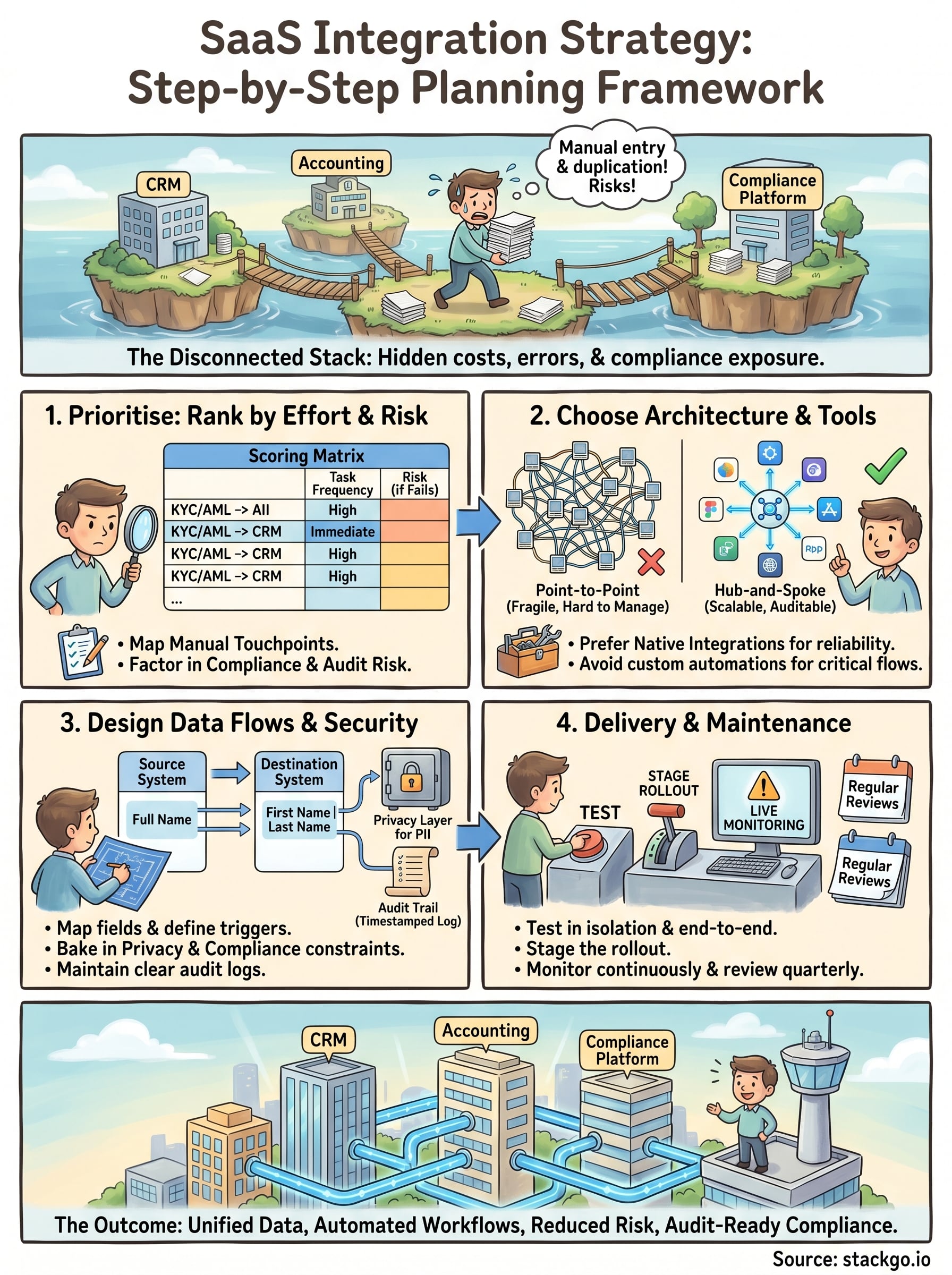
Not every integration deserves the same urgency. A solid saas integration strategy starts with ranking your integration candidates by two factors: how much manual work they generate, and how much risk they carry if something goes wrong. This gives you a clear order of priority rather than trying to connect everything at once, which typically ends with a half-finished stack that creates more confusion than it solves.
Map your manual touchpoints first
Start by listing every workflow where your team moves data by hand between two or more systems. Think about where people copy-paste contact details, where they manually update records after a call, or where compliance outcomes get logged in a spreadsheet because there’s no direct path into your CRM. Each of these touchpoints is a candidate for integration.
The ones that happen daily or weekly sit at the top of your priority list, because the time savings there compound quickly. A task that takes five minutes and happens twenty times a week is costing your business over 80 hours a year on that one step alone.
The fastest way to build the case for integration investment is to count how many hours per week your team spends moving data that software could handle automatically.
Factor in compliance and audit risk
Beyond time, consider what breaks if a data transfer fails or runs late. For regulated businesses like accounting firms or financial services practices, an incomplete identity verification record is not just an inconvenience; it is a compliance gap. When your KYC or AML screening results do not automatically write back to the contact record in your CRM, someone has to do it manually, and that creates a window for error or omission.
Integrations that sit inside a compliance workflow should move up your priority list regardless of how often they run. A check that happens once per client still needs a reliable, auditable data path. Prioritising these integrations protects your business from the kind of errors that surface during regulatory reviews, not just the ones that slow your team down on a busy day.
Build a simple scoring matrix
Rank each integration candidate across two dimensions: frequency of the manual task and risk level if the task fails or produces an error. Use a simple table:
| Integration candidate | Task frequency | Risk if it fails | Priority |
|---|---|---|---|
| KYC/AML result to CRM | Per client onboarding | High (compliance gap) | Immediate |
| Invoice data to accounting | Daily | Medium (billing errors) | High |
| Meeting notes to CRM | Weekly | Low | Later |
This keeps your rollout focused and ensures your team sees real efficiency and compliance gains from the very first integrations you build.
Choose an integration architecture that scales
Once you know which integrations to build first, you need to decide how to build them. The architecture you choose determines whether your integration layer holds up as your stack grows or becomes a maintenance burden that slows everything down. Most businesses start with whatever seems quickest, then discover that short-term convenience creates long-term fragility when they try to add the next tool.
Point-to-point vs hub-and-spoke
Point-to-point integration connects two systems directly. It is fast to set up for a single connection, but each new tool you add requires a new direct link to every other tool it needs to communicate with. With five systems, you could be managing ten separate connections. With ten systems, that number climbs to forty-five. The connections multiply faster than your team can reasonably manage them.
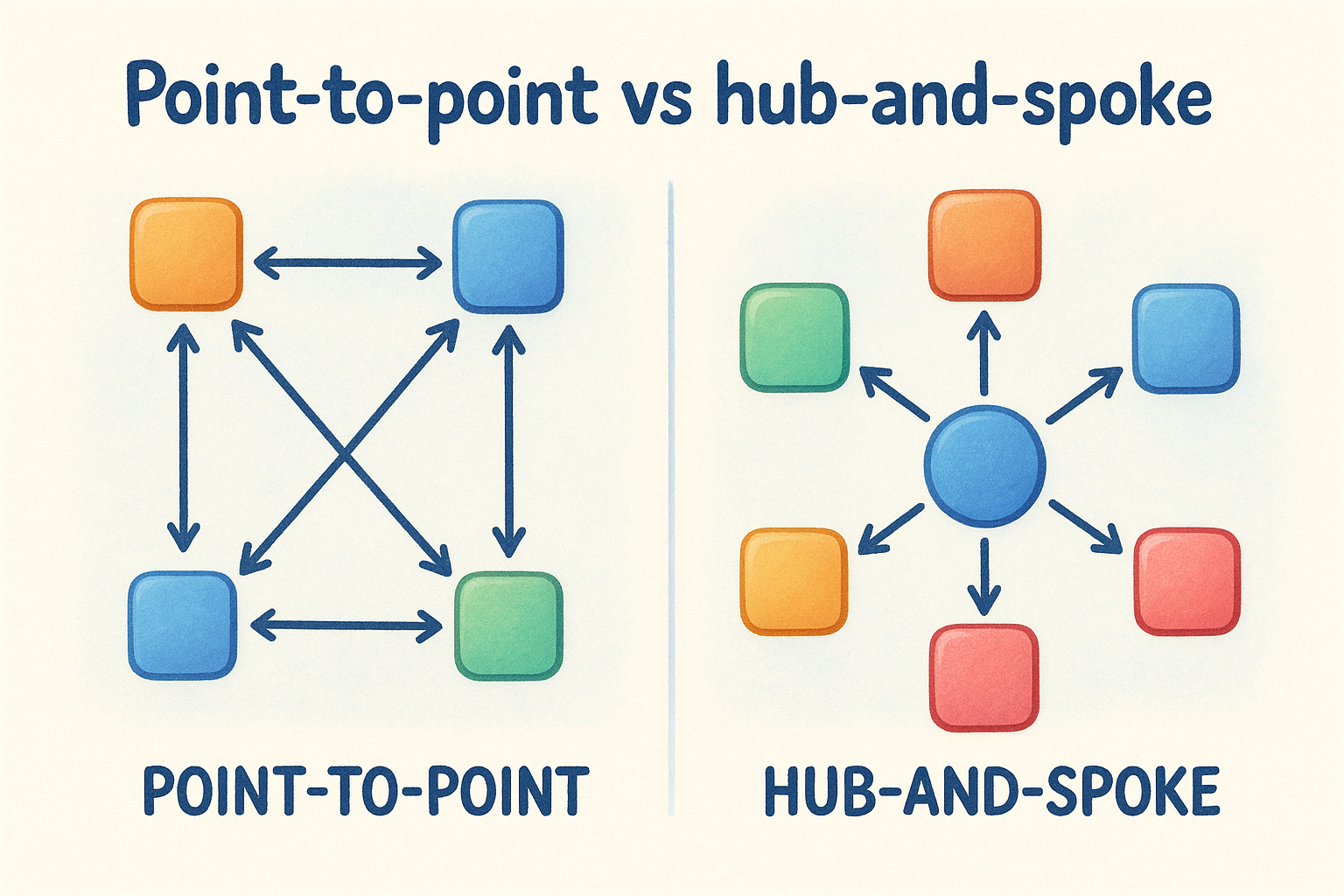
Hub-and-spoke architecture routes all data through a central layer, so each system only needs one connection: to the hub. When you add a new tool, you connect it to the hub, and it gains access to everything else in your stack. This approach is significantly easier to maintain and audit, which matters a great deal when your saas integration strategy needs to support compliance workflows with a clear data trail.
The architecture decision you make early becomes the foundation everything else is built on, so it is worth getting right before you have ten systems depending on it.
When native integrations beat custom-built connections
Native integrations are pre-built connections designed specifically for the platforms they connect. They require no custom development, come with built-in error handling, and are maintained by the vendor. For most businesses, particularly those without a dedicated development team, native integrations offer the fastest path to a reliable, auditable data flow without the ongoing maintenance overhead of custom-built solutions.
Custom integrations built through automation tools can work for low-stakes workflows, but they tend to break silently. A failed step in a multi-stage automation does not always surface an obvious error, which means critical data like identity verification results can fail to transfer without anyone noticing until a compliance review surfaces the gap. For regulated industries, that risk is simply not worth the flexibility custom-built connections appear to offer.
Design data flows, APIs, and workflows
Once you have your architecture in place, the next step in your saas integration strategy is to map exactly how data moves between systems. This means deciding which fields transfer, in which direction, and under what conditions. Skipping this step is one of the most common reasons integrations break or produce incomplete records after launch.
Map your data fields before you build
Every integration transfers specific fields, and each field needs a clear mapping between the source system and the destination. A contact’s name in your CRM might be stored as a single "Full Name" field, while your compliance platform splits it into "First Name" and "Last Name." Without a documented field map, you either lose data or create records that do not match.
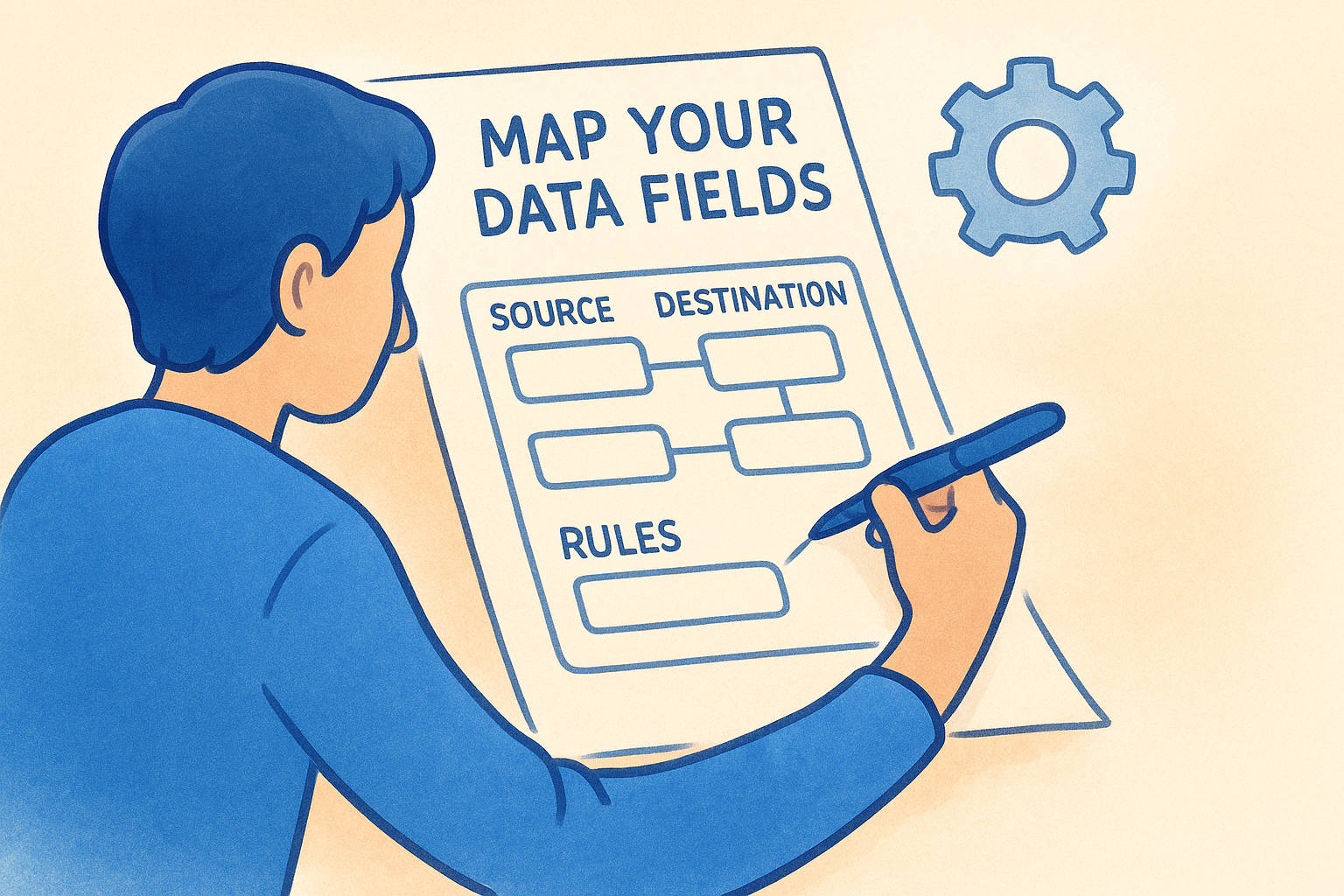
Build a simple mapping table for each integration that lists the source field, the destination field, and any transformation rules that apply. If a field needs to be reformatted, concatenated, or conditionally included, document that logic before you touch any configuration. This gives your team a reference point and makes troubleshooting significantly faster when something does not transfer correctly.
Getting your field mapping right on paper before you touch any system saves you from chasing data discrepancies after go-live.
Define your workflow triggers and logic
Triggers determine when data moves, so defining them precisely is critical. A trigger might be a new contact created in your CRM, a completed form submission, or a verification outcome returned from your compliance platform. Each trigger should have a single, unambiguous condition that fires the workflow, not a broad rule that catches too many events and creates noise.
Conditional logic controls what happens after the trigger fires. For example, if an identity check returns a pass result, the workflow writes the outcome back to the contact record and marks onboarding complete. If it returns a fail, the workflow routes the case to a review queue. Mapping this logic explicitly before you configure anything ensures that every edge case has a defined path and nothing falls into a gap between systems.
Workflows that handle compliance-sensitive data require particular care at this stage. Each step should produce a clear, timestamped record so you can demonstrate exactly what happened and when during an audit.
Bake in security, privacy, and compliance
Security and privacy are not features you add after your integrations are running. They need to be built into the design from the start, because retrofitting them once data is already flowing between systems is significantly harder than accounting for them upfront. Your saas integration strategy should treat compliance requirements as a constraint that shapes how you build, not a checkbox you tick before go-live.
Control which data crosses system boundaries
Not every field in your CRM or compliance platform needs to travel to every connected system. Limiting data transfer to only the fields a receiving system genuinely requires reduces your exposure if one platform in your stack is ever compromised. Start by asking, for each integration, exactly which fields the destination system needs to function, and transfer nothing beyond that.
Access controls should apply at both ends of every integration. The service account or API credential used to push data into a system should hold the minimum permissions needed for that specific workflow, nothing broader. Review these permissions regularly, especially when team members change roles or leave the business.
Handle PII with a dedicated privacy layer
When your integrations move personally identifiable information (PII) such as passport details, date of birth, or identity verification documents, you need a clear policy for where that data lives and who can access it. Storing sensitive identity data directly inside a CRM contact record creates unnecessary risk, because CRM access is often broad and poorly audited.

The safest approach is to keep PII out of your CRM entirely and instead write only the outcome of a verification back to the contact record.
A dedicated privacy layer sits between your compliance platform and your CRM, holding raw identity data separately and making it accessible only to authorised users through multi-factor authentication. This approach reduces the attack surface and gives you a clean separation between operational data and sensitive personal records. It also simplifies your obligations under Australian Privacy Act requirements, because you have a single, controlled location for sensitive data rather than fragments scattered across multiple systems.
Keep a clear audit trail for every data transfer
Each automated data transfer in your integration stack should write a timestamped log that records what moved, when it moved, and which system triggered the action. This gives you the evidence you need during a compliance review to demonstrate that your workflows ran correctly and that no records were missed or altered.
Audit logs should be stored independently of the systems they record, so that a failure or change in one platform does not affect your ability to reconstruct what happened. For businesses with regulatory obligations around identity verification or AML screening, this is not optional; it is the baseline your auditors will expect.
Pick the right tools for your team
Your saas integration strategy is only as strong as the tools you use to execute it. The market offers everything from low-code automation builders to enterprise middleware platforms, and the range of options makes it genuinely difficult to know what fits your business. The right choice depends on your team’s technical capacity, the compliance sensitivity of your workflows, and how much ongoing maintenance you can realistically support.
Native integrations vs automation platforms
Native integrations are purpose-built connections between two specific platforms. They are designed by vendors who understand both systems, which means they come with built-in error handling, defined field mappings, and reliable data transfer paths from day one. For compliance-critical workflows like identity verification or KYC checks, a native integration removes the guesswork and gives you a connection you can actually audit.
Automation platforms like Zapier or Make offer flexibility, but that flexibility comes with trade-offs. Multi-step automations can fail silently at any point in the chain, which means a critical record may never reach its destination without anyone on your team knowing. For regulated industries, where a missing verification outcome creates a real compliance gap, that unpredictability is a material risk rather than just an inconvenience.
If a workflow touches sensitive client data or sits inside a compliance process, the stability of a native integration is worth far more than the flexibility of a custom automation.
Questions to ask before committing to a tool
Before you select any integration tool, work through a short set of questions to test whether it fits your actual needs, not just what the vendor’s website describes.
- Does it support the specific platforms in your current stack, including your CRM and any compliance or accounting tools?
- What happens when a data transfer fails? Does the tool alert your team, retry automatically, or fail silently?
- Does it maintain a timestamped audit log of every data movement, so you can reconstruct what happened during a review?
- Can you control access permissions at the field or workflow level, rather than granting broad system access?
- What does ongoing maintenance look like if a connected platform updates its API?
Running through these questions for each tool candidate gives you a structured basis for comparison and surfaces the practical gaps that demos rarely show.
Run delivery: testing, rollout, and monitoring
Building integrations without a structured delivery process is how teams end up discovering critical data gaps in production, under pressure, with real client records at stake. Your saas integration strategy needs a delivery phase that moves deliberately: test in isolation first, roll out incrementally, then monitor continuously once everything is live.
Test before you go live
Unit testing checks each individual integration in isolation before it connects to anything else. Run your field mappings with sample data and confirm that every value lands in the correct destination field, formatted correctly. Pay particular attention to edge cases: what happens when a required field is empty, when a verification returns an unexpected status, or when the same record triggers the workflow twice.
End-to-end testing simulates a real workflow from trigger to outcome across all connected systems. Run it with test accounts rather than live client data, and confirm that each step produces the expected result in the expected system. Document the results of every test run so you have a baseline to compare against when something behaves differently after go-live.
Testing with realistic but non-production data is the single fastest way to surface field mapping errors before they affect real client records.
Stage your rollout
Phased rollouts reduce the blast radius if something goes wrong. Start with a small group of users or a single office, run the integration in parallel with your existing manual process for a short period, and compare outputs. If the automated result matches what your team would have produced manually, you can expand with confidence. If it does not, you have caught the issue before it affected your entire client base.
Change management matters here as much as the technical work. Brief your team clearly on what the integration does, what they no longer need to do manually, and what they should flag if something looks wrong. Staff who understand the new workflow catch errors faster than any monitoring tool.
Monitor after launch
Set up automated alerts for failed data transfers, missed triggers, or unusually long processing times. Passive monitoring, where you check in occasionally and assume everything is fine, is not adequate for compliance-sensitive workflows. Your team needs to know the moment a KYC result fails to write back to a contact record, not three weeks later during a file review.
Review your integration logs on a regular schedule and establish a clear owner for each integration who takes responsibility for investigating alerts promptly.
Keep your integrations reliable as you grow
A saas integration strategy is not a project you complete once and move on from. Your stack will change, platforms will update their APIs, and your compliance obligations will evolve. Building a regular review cycle into your integration program, quarterly at minimum, keeps your connections current and surfaces issues before they affect live workflows.
Treat each integration as an ongoing operational responsibility rather than a completed task. Assign a named owner for every critical connection, review your audit logs on a schedule, and re-test any workflow whenever a connected platform releases a significant update. The businesses that maintain reliable integrations are the ones that treat maintenance as standard practice, not as a reaction to failure.
If your compliance workflows include identity verification or AML screening, see how IdentityCheck handles AUSTRAC Tranche 2 AML/CTF directly inside your existing software and test whether it fits your business with a free account at StackGo.


